Identifying and Controlling 10 Hazards in the Workplace
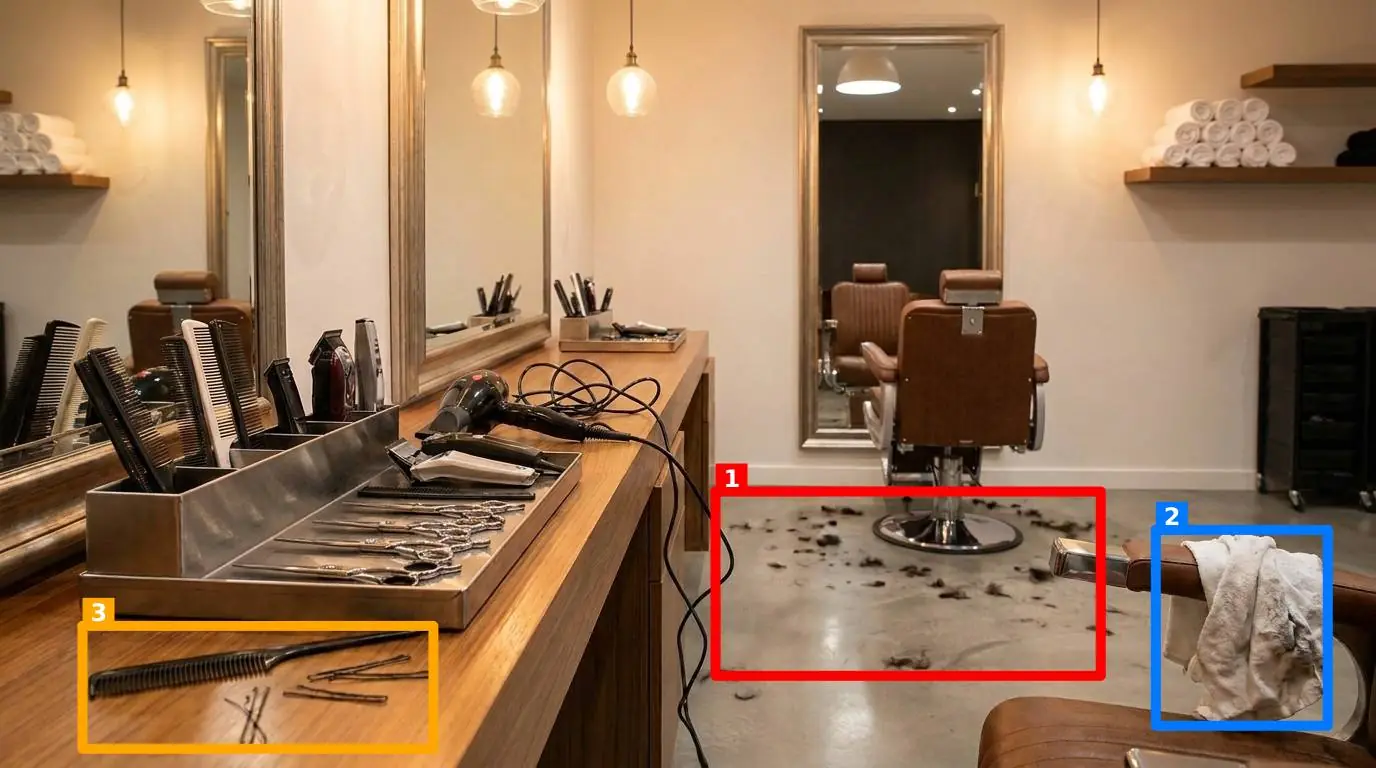
Walk the floor of any facility on a Tuesday morning, and you will see the gap between the safety manual in the office and the reality of the shift. The manual says that every workstation must be clear of debris and every fire exit must be unobstructed. The reality is a pallet of incoming components sitting three feet in front of the emergency push-bar because the loading dock is full, or a mop bucket left in a dim corridor because a spill happened ten minutes before a break. These are not signs of a failing business; they are the natural drift of a busy operation. However, managing this drift requires more than just a monthly walk-through. It requires a systematic approach to identifying 10 hazards in the workplace that occur so frequently they often become invisible to the people working right next to them.
The challenge for a site manager or an EHS lead is not just spotting a hazard; it is sustaining the standard after you have walked away. Most safety programs rely on paper checklists or basic apps that ask a worker to check a box. The problem is that a checked box is a claim, not evidence. When a supervisor is under pressure to hit production numbers, the temptation to check the box without looking closely at the racking or the shadow board is immense. To truly control 10 hazards in the workplace, we need to move from subjective checks to objective, visual evidence. This transition changes the conversation from Did you check it? to Does it look like the standard?
The Psychology of the Invisible Hazard
Hazards become invisible through a process called habituation. When a worker walks past a frayed extension cord every day for a week without an incident, their brain stops flagging it as a threat. It simply becomes part of the landscape, like the color of the walls. This is why external audits often find dozens of issues that the local team genuinely missed. They weren't being lazy; they were simply used to the environment. To break this cycle, the inspection process must force a comparison between the current state and a known-good reference state.
Traditional audit and inspection management software often fails here because it still relies on the user's judgment. If the user is habituated to the mess, the software records a pass. True safety management requires a tool that disrupts this habituation by requiring a visual match. By defining what a safe station looks like through a reference photo, you create an anchor. Anything that deviates from that anchor is a hazard, regardless of how long it has been sitting there.
Identifying and Mitigating 10 Hazards in the Workplace
While every industry has specific risks, there are ten common hazards that appear across manufacturing and production floors, warehouses, and retail environments. Identifying these is the first step toward building a robust visual standard.
| Hazard Type | Specific Example on the Floor | Visual Control Point |
|---|---|---|
| Slips and Trips | Mop buckets or cleaning supplies left in walkways. | Janitor closet or designated cleaning station. |
| Blocked Access | Pallets or trash bins placed in front of fire exits. | Floor markings at emergency exit points. |
| Tool Misplacement | Torque wrenches or cutters left on work surfaces. | Shadow boards with defined tool outlines. |
| Chemical Risks | Unlabeled spray bottles or open solvent containers. | Hazardous material storage cabinets. |
| Electrical Safety | Daisy-chained power strips or blocked panels. | Electrical panel clearance zones. |
| Fire Hazards | Accumulated cardboard or oily rags near heat. | Waste collection bins and disposal schedules. |
| Ergonomic Strains | Workstations cluttered, forcing awkward reaches. | Standardized bench layout. |
| Falling Objects | Items stored on top of lockers or unstable racking. | Upper shelf limits and racking securement. |
| Missing Guarding | Machine guards removed for maintenance and not replaced. | Equipment interlock and guard positions. |
| PPE Non-use | Safety glasses or gloves left on the bench. | PPE dispensers and entry-point signage. |
Each of these hazards can be managed through a visual standard. For example, rather than asking Is the fire exit clear?, the manager defines a control point at the exit. A reference photo shows the area perfectly clear with the yellow floor markings visible. When a worker performs a round, they take a photo of that same spot. The comparison is immediate and undeniable. If a pallet is in the way, the deviation is recorded.
1. The Stationary Trip Hazard
We often think of trip hazards as temporary spills, but the most dangerous ones are permanent fixtures that shouldn't be there. A compressor hose that isn't retracted or a floor scale with a protruding edge. By photographing these stations daily, you can track whether the hose is consistently left out, indicating a mechanical failure in the reel or a behavioral issue with the operator.
2. The Propped Fire Door
In hot weather, the temptation to prop open a fire door for ventilation is high. This compromises the building's fire containment strategy. A visual check ensures that the door is closed and the latch is engaged. This is a perfect example of where why your next software checklist fails; a worker can easily check yes while the door is held open by a brick. A photo, however, captures the brick.
3. Shadow Board Discipline
In a high-speed environment, tools are often dropped on the bench rather than returned to the board. This isn't just a 5S issue; it's a safety issue. A loose wrench can be knocked into moving machinery or become a projectile. Verifying the shadow board through a quick photo ensures that every tool is in its place before the next shift starts. This is a core component of enforcing 5S safety standards without paperwork fatigue.
Implementing Visual Standards Without the Friction
The reason most safety initiatives die is friction. If a worker has to log into a complex system, navigate through three menus, and type a description of a hazard, they will only do it when they absolutely have to. For daily rounds, the process must be as fast as taking a snapshot for social media.
This is where the technology must meet the worker where they are. Rather than requiring a dedicated mobile app that needs updating and permissions, the most effective systems work directly in a phone browser. A worker walks to a station, opens the site, and takes a photo. Using AI, SnapAudit compares that live photo against the manager's reference image. It doesn't just say there is a problem; it draws colored boxes around the specific hazards, like a misplaced tool or a pile of debris, and returns a score out of 100.
This provides immediate feedback to the worker. They don't have to wait for a supervisor to review their work. If the score is low because they left a pallet in the walkway, they can move the pallet and take another photo to correct the record instantly. This creates a self-correcting loop on the floor.
The Role of Data in Hazard Prevention
Identifying 10 hazards in the workplace once is a safety win; identifying them every day for a year is a management system. The real power of moving from paper to visual AI is the data trail it leaves behind. Every photo contains metadata that confirms the time and location, preventing the use of old photos to bypass the system.
Over time, this data allows for a Pareto analysis of your safety risks. You might find that while you have ten different hazards you are tracking, 80% of your failures are occurring at the same three stations. Perhaps the shadow board in the assembly area is consistently missing a specific tool, or the fire exit in the warehouse is blocked every Tuesday morning when the new stock arrives. This insight allows you to move from reactive firefighting to proactive process improvement. You can adjust the layout of the warehouse or buy more of the frequently lost tools, solving the root cause of the hazard.
For managers overseeing multiple sites, this visibility is even more critical. You cannot be at five different locations at once, but you can receive a Telegram or email notification when a high-risk area in any of those sites fails a visual audit. This allows you to support your site leads where they need it most, rather than conducting random spot checks that may or may not catch the real issues. You can see the history of each control point and understand which sites are maintaining the standard and which are experiencing the drift.
How to Start Your Visual Safety Transition
If you are currently relying on paper or a simple checklist app, the transition to a visual standard does not have to happen overnight. You don't need to map every square inch of your facility. Start with the areas where the risks are highest or where the standard is hardest to maintain. This is a common strategy when auditing warehouse stations effectively.
- Identify your high-risk points: Choose five to ten locations where a hazard is most likely to occur (e.g., the chemical rack, the main fire exit, the most complex workstation).
- Define the 'Gold Standard': Clean the area, organize the tools, and ensure all safety equipment is present. Take one clear reference photo of this state.
- Set the criteria: Decide what the AI should look for at each point. This might be the presence of a fire extinguisher, the absence of clutter in a walkway, or the correct orientation of a safety guard.
- Run a pilot round: Group these points into a single round and have a shift lead walk the route. The goal is to ensure the reference photos are clear and the instructions are simple.
- Review and expand: Use the Pareto view to see which hazards are recurring and address the root causes. Once the first ten points are stable, add the next ten.
Safety is not a project that you complete; it is a state of mind that you maintain. By using visual standards to identify 10 hazards in the workplace, you take the guesswork out of inspections. You provide your team with a clear, unarguable definition of what safe looks like, and you give yourself the data needed to keep it that way. The goal is to make the invisible hazards visible again, ensuring that every worker goes home in the same condition they arrived.
Implementing this doesn't require a massive investment in infrastructure. Tools like SnapAudit allow you to start small, focusing on the five criteria that matter most: presence, cleanliness, clutter, position, and orientation. By turning the phone in a worker's pocket into a tool for safety verification, you bridge the gap between the manual and the floor, one photo at a time.