Why Your Next Software Check List Fails on the Floor
The Lie of the Paperless Transition
Every Tuesday morning at 6:00 AM, a shift supervisor walks through Zone 3. They have a clipboard or a basic digital form. They check if the torque wrench is back on its shadow board, if the mop is left in the walkway, if an expired lot is sitting on a prep shelf, or if a fire door is propped open. They tap "Yes", "Yes", "Yes", and "Yes".
If you run a factory, a commercial kitchen, or a distribution center, you already know the limits of this routine. You might have even started looking for a digital alternative, typing a term like software check list into a search engine hoping to find a quick fix for pencil-whipping. But digitizing a broken process does not fix the process; it just makes the errors legible on a screen.
Why the Standard Software Check List Breeds Pencil-Whipping
The fundamental flaw of the traditional digital checklist is that it relies on trust without verification. When a worker or a supervisor is staring down a 40-item list at the end of an exhausting shift, the friction of actually inspecting every single point competes with the desire to go home. The checklist becomes a chore to be completed rather than a tool for quality control.
Text-based questions invite subjective interpretation. "Is the workstation clean?" is a relative question. To a new hire, a light dusting of metal shavings around a lathe might look acceptable. To a quality manager with twenty years of experience on manufacturing and production floors, those shavings are a safety hazard and a sign of poor tool maintenance.
When you replace paper with a typical digital tool, you often just transfer the same subjective blind spots onto a smaller screen. Supervisors scroll through screens, tap the checkboxes as fast as humanly possible, and submit the report. The front office gets a clean report with 100% compliance, while the floor remains cluttered, unsafe, and inconsistent. If you are comparing options like a dedicated audit and inspection management software against legacy tools, you have likely run into this exact wall.
The High Friction of App-Free Auditing
Most digital audit tools on the market expect you to manage a complex IT footprint. They require workers to install dedicated software on their phones, set up user accounts, manage passwords, and wait for syncs. On a busy floor with high turnover, this administrative overhead is a quiet killer of compliance.
If a temporary worker or a cross-trained operator from another department covers a shift, they cannot run the audit because they do not have the right software installed or their login expired. The supervisor ends up doing it for them, or worse, skipping it entirely.
True operational control requires zero-friction access. A worker should be able to walk up to a station, open their phone browser, and immediately record the state of that station. No software to install, no password resets, and no training sessions. The technology must recede into the background so the physical state of the floor remains the focus.
Shifting from Text to Visual Ground Truth
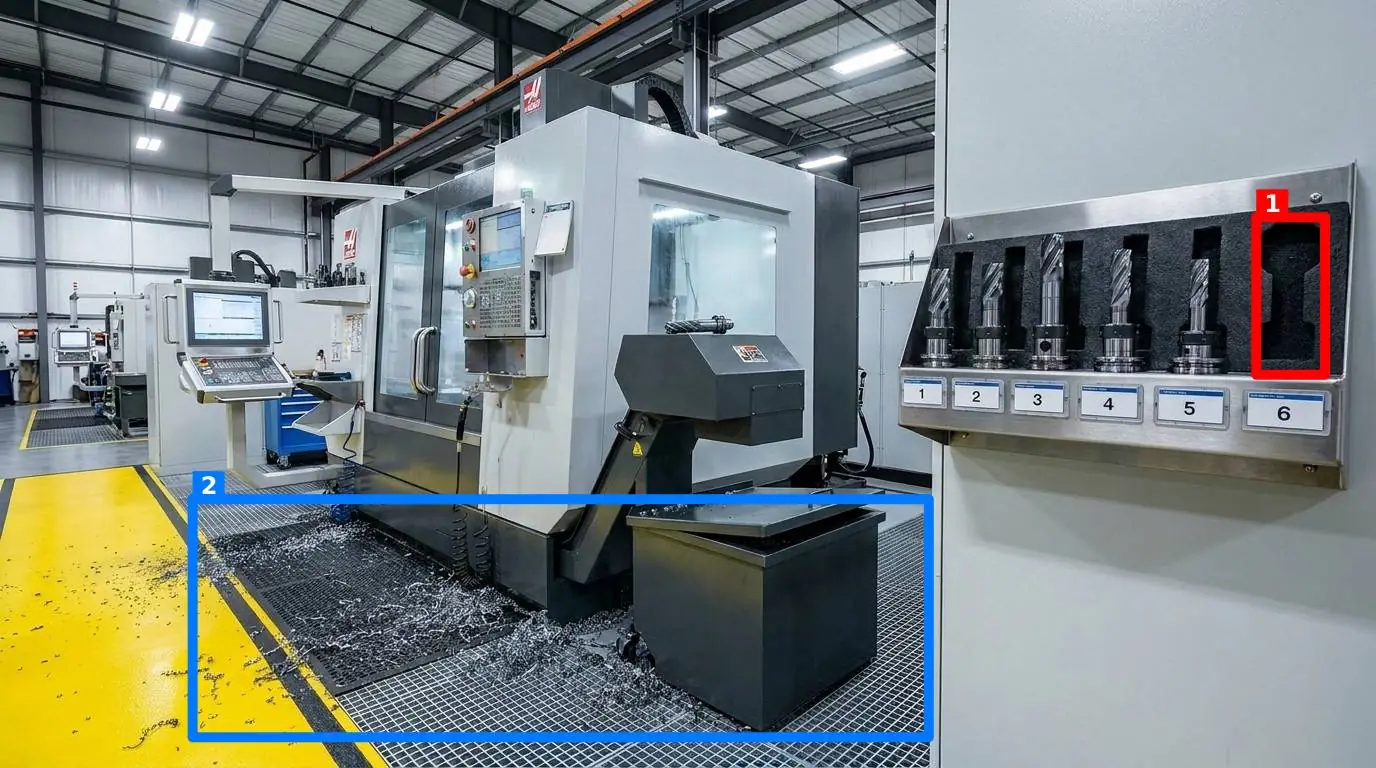
How do you remove subjectivity from an audit? You stop asking workers to read text and start asking them to match a picture. A visual standard is unambiguous. A torque wrench is either resting in its designated cutout on the shadow board, or it is not. A mop is either drying in the janitor closet, or it is blocking a fire exit. This visual approach is critical whether you manage warehouses and distribution centres or precision assembly lines.
By defining clear control points—a specific assembly station, a prep shelf, a machine face, or a critical fire door—and taking one reference photo showing exactly how that point must look when compliant, you establish an objective baseline.
Instead of a worker self-reporting compliance, they simply take a photo of the control point in their phone browser. AI instantly compares the fresh photo against your reference photo. It returns a score out of 100, draws colored boxes on the image around the specific discrepancies, and displays a short, clear message for the worker.
If you are evaluating options in this space and looking at how this compares with SafetyCulture, the key difference is the reliance on automated visual verification rather than manual form-filling. The AI does not replace your operational judgment; it records objective evidence so you do not have to argue about whether a station is clean enough.
The Five Dimensions of a Visual Audit
To be useful on a busy floor, you need granular control over what the AI is actually checking. For any given control point, a manager should be able to toggle five distinct criteria on or off:
- Presence of required items: Are the safety glasses, the lock-out tag, or the instruction manual where they belong?
- Cleanliness: Is the surface free of grease, dust, or spills?
- Clutter: Are there unauthorized tools, personal drinks, or scrap material left in the work zone?
- Position: Are the jigs, fixtures, or safety guards aligned correctly?
- Orientation: Is the valve handle turned to the closed position, or is a sign hung upside down?
Structuring Your First Visual Inspection Round
To move from a text-based checklist to a visual audit system, you must map your floor into structured control points. Instead of auditing an entire room as one abstract item, break it down into physical zones that can be photographed in a single frame. You can then group these control points into a single round. This allows an inspector to walk a logical path through the facility, capturing each point in sequence.
Below is an example of how to structure a visual audit round for a typical assembly or packing area:
| Control Point | Reference State (Ideal Photo) | Monitored Criteria | Typical Floor Action on Failure |
|---|---|---|---|
| Assembly Station 4 | Torque wrench in shadow board, safety glasses in cradle, surface wiped clean. | Presence, Cleanliness, Clutter | Return wrench to board, wipe surface, retake photo. |
| Emergency Exit Door | Door fully closed, yellow floor lines completely clear of boxes or mops. | Clutter, Position | Remove obstruction immediately, clear the egress path. |
| Prep Shelf | Current lot label visible, older lots removed, no empty cardboard boxes. | Presence, Clutter, Orientation | Remove empty packaging, ensure only active lot is present. |
| Lathe Control Panel | Guard in place, emergency stop button clear, grease wiped from dials. | Position, Cleanliness | Clean dials, verify guard position, re-run visual check. |
Closing the Loop Without Adding Admin Overhead
Capturing data is only half the battle. If a supervisor has to log into a complex dashboard every afternoon just to see if the morning shift did their walks, the system will eventually be abandoned. Information must flow automatically to the people who can act on it.
When a worker completes a round, the results—including the scored photos with colored boxes highlighting the issues—should be delivered instantly by email or Telegram to whoever is on the notification list for that specific room. Crucially, this must include team members who do not have an administrative account on the platform. A maintenance lead or a department manager does not need another software subscription; they just need to see the red box around the propped-open fire door in their messaging app.
To ensure these audits are honest, the system must verify photo freshness. A common workaround with digital checklists is for workers to upload a gallery photo taken weeks ago when the station was perfect. By checking the image metadata, the platform ensures that an old picture cannot be re-submitted as today's work.
Over time, this objective history builds a reliable record. Instead of guessing which lines are struggling, you can review a Pareto view of which specific problems recur. If a station constantly flags clutter on Thursday afternoons, you do not need a general training session; you need to look at the material flow for that specific shift.
Your Transition Plan: From Checklist to Visual Proof
If you are ready to move away from subjective checklists, do not try to overhaul your entire multi-site operation overnight. Start small, prove the concept, and scale.
- Identify one high-friction area: Choose a single department, production line, or prep station that regularly suffers from quality or safety slip-ups.
- Define three control points: Take a high-quality reference photo of each point in its ideal, compliant state. Make sure the lighting is clear and the boundaries of the station are obvious.
- Set up your notification list: Decide who needs to know when a point fails. Add their email or Telegram handle to the notification settings for that zone.
- Train one operator: Show them how to open the browser on their phone, navigate to the link, and snap the photo. No software downloads required.
- Review the Pareto data after two weeks: Look at the recurring flags. Use this visual history to adjust your physical layout or standard operating procedures.
If you want to see how this works in practice, you can explore the SnapAudit product overview or check our clear, tiered pricing to see how easy it is to scale this across your sites. By replacing a text-based software check list with visual proof, you take the guesswork out of floor management and put the focus back on real, verifiable standards.