Beyond the Poster: Enforcing 10 Kitchen Safety Rules Every Day
The Gap Between the Poster and the Prep Line
The lunch rush is over, the line is a mess, and the shift lead is holding a clipboard. You know the scene. There is a faded poster on the wall near the walk-in that lists your safety protocols, but during the heat of service, that poster might as well be invisible. The reality of a high-volume kitchen is that safety is often the first thing to slip when the tickets start piling up. Instead of a static list, these 10 kitchen safety rules must become living standards that are verified at the station level, not just discussed in a quarterly meeting.
As an operations lead or a quality manager overseeing multiple sites, the challenge is not just knowing what the rules are. The challenge is ensuring that a supervisor in a kitchen three hundred miles away is looking at the same details you are. When we talk about safety, we are talking about concrete things: a mop left in a walkway that becomes a trip hazard, an expired lot on a prep shelf that threatens food safety, or a knife left on the edge of a stainless steel table. To manage these risks effectively, we have to move beyond the traditional walkthrough and toward a system of visual accountability.
The 10 Kitchen Safety Rules That Keep Your Line Moving
To keep a kitchen running safely, you need to focus on the high-risk areas where human error is most likely to occur. These ten rules provide the foundation for a safe environment. However, simply telling staff to follow them is rarely enough. You need a way to verify that the standard is being met in real-time.
- Keep Walkways and Exits Clear: A mop bucket left in a walkway or a stack of delivery boxes blocking a fire exit is a disaster waiting to happen. The floor must be clear of all obstructions at all times.
- Store Knives Safely: Knives should never be left in a sink or a cluttered drawer. Use magnetic strips or dedicated knife blocks to ensure blades are visible and secure.
- Segregate Chemicals: Cleaning agents must never be stored above or adjacent to food prep surfaces. A single leak can contaminate an entire shift's worth of inventory.
- Maintain Stocked Handwashing Stations: A sink without soap or paper towels is a station that won't be used. These must be checked at the start of every shift.
- Ensure Machine Guards are in Place: Meat slicers and industrial mixers must have their safety guards engaged. If a guard is missing or bypassed, the machine is out of service.
- Use Color-Coded Cutting Boards: To prevent cross-contamination, use specific colors for raw meat, poultry, and vegetables. Visual verification ensures the right board is on the right station.
- Label and Rotate Inventory: Every container must have a lot number and an expiration date. Follow the First-Expired, First-Out (FEFO) principle to minimize waste and risk.
- Manage Electrical Hazards: In a wet environment, cable management is critical. Cords should be coiled and kept away from standing water or heat sources.
- Wear Correct PPE: Cut-resistant gloves at the prep station and non-slip shoes on the floor are non-negotiable requirements for every staff member.
- Keep Fire Extinguishers Accessible: Every extinguisher must be in its designated spot, with the pressure gauge in the green and no equipment blocking access.
Why Traditional Checklists Fail the Kitchen Floor
If you are currently using a paper checklist or a basic digital form, you are likely dealing with the phenomenon of pencil-whipping. This is when a worker marks a task as complete without actually performing the check. It is a natural human response to a repetitive, boring task, but it makes your data useless. You might see a '100% compliant' report on your desk while the actual kitchen floor is a mess of safety violations. In fact, food safety audit checklists often have hidden flaws that mask the real risks in your operation.
The problem is that a checklist is abstract. It asks, 'Is the floor clean?' and the worker answers 'Yes.' But 'clean' is subjective. What a tired closer thinks is clean at 11:00 PM is very different from what a health inspector thinks the next morning. This subjectivity is why your 5S audit checklist lies to you. To fix this, you need to replace the question with a visual standard. Instead of asking if the station is organized, you compare the station against a reference photo of what 'perfect' looks like.
The Shift to Visual Standards and AI Verification
This is where a tool like SnapAudit changes the dynamic of the kitchen audit. Instead of checking boxes, the worker uses their phone browser to take a photo of a station. No app installation is required, which is critical for high-turnover environments where you don't want to manage dozens of user accounts or device permissions. The system then uses AI to compare that live photo against a reference photo that you, the manager, have previously defined as the standard.
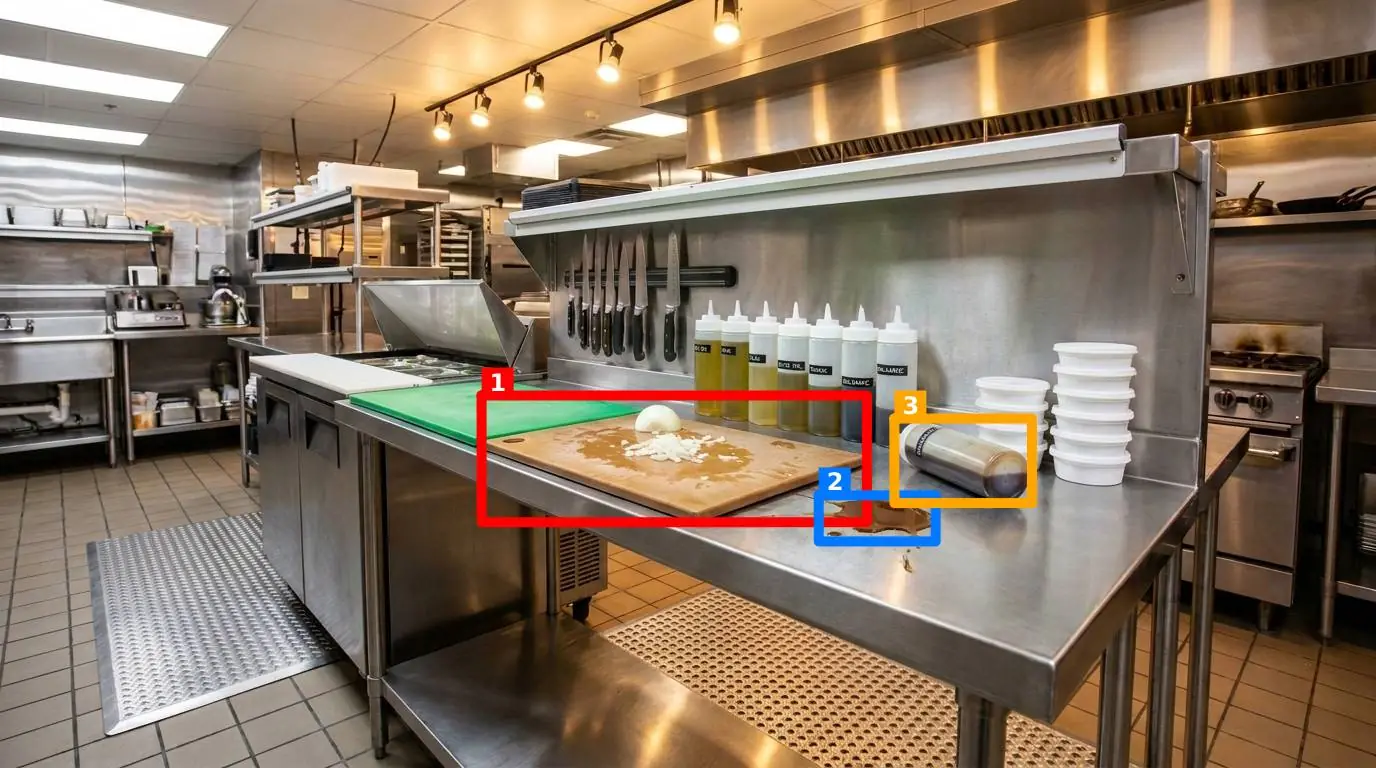
The AI returns a score out of 100 and draws colored boxes directly on the image to highlight problems. If a knife is left on a prep table instead of the rack, the AI boxes it. If a mop is left in a walkway, the AI flags it. This provides the worker with immediate, objective feedback. They don't have to wonder why they lost points; they can see the colored boxes on the screen and fix the issue before the shift continues. This turns the audit from a 'gotcha' exercise into a real-time coaching tool.
The Five Pillars of a Visual Audit
When you set up a control point for a kitchen station, you can toggle five specific criteria depending on what matters most for that area:
- Presence: Is the fire extinguisher actually there? Is the first aid kit in its bracket?
- Cleanliness: Is there grease buildup on the slicer? Is the stainless steel surface wiped down?
- Clutter: Are there random personal items or empty boxes taking up prep space?
- Position: Is the trash can in its designated spot? Is the prep table aligned correctly?
- Orientation: Is the slicer guard closed? Are the handles of the pots turned inward on the range?
Scaling Safety Across Multiple Sites
For a manager overseeing five, fifty, or five hundred sites, the biggest challenge is visibility. You cannot be everywhere at once. By using restaurants and commercial kitchens as a focused industry within a visual audit system, you can group individual control points into a 'round.' A worker can walk through the entire kitchen, photographing the prep line, the walk-in, the dish pit, and the loading dock in a single pass.
The results of these rounds are delivered instantly via email or Telegram to the people who need to know. This includes site managers who might not even have an account in the system but need to see the daily status of their floor. Because the system checks the photo freshness from the image metadata, you can be certain that the photo was taken right then and there, not recycled from a 'good day' last month. This creates a level of trust in the data that paper checklists can never provide.
| Audit Method | Feedback Loop | Data Integrity | Management Visibility |
|---|---|---|---|
| Paper Checklist | Delayed (days/weeks) | Low (Pencil-whipping) | Blind spots between site visits |
| Basic App | Instant but subjective | Medium (Manual entry) | Requires manual report collation |
| Visual AI Audit | Real-time and objective | High (Metadata + Photos) | Pareto view of recurring failures |
Over time, this visual history builds a powerful dataset. You can use the Pareto view to see exactly which of the 10 kitchen safety rules is failing most often across your entire organization. If Rule #3 (Chemical Storage) is a recurring issue at twelve different sites, you know exactly where to focus your next training session or capital expenditure. You are no longer guessing; you are managing by evidence.
How to Start Improving Your Kitchen Standards
If you're ready to move beyond the clipboard, don't try to boil the ocean. Start by identifying your three highest-risk stations. This might be the main prep line, the chemical storage area, and the dish pit. Take one 'perfect' reference photo of each station exactly how it should look at the start of a shift. Then, have your team start photographing those points daily using their phone browsers. When you find yourself finding the right app for safety inspections, focus on tools that emphasize the visual over the verbal.
The goal is to create a culture where the standard is visible and the feedback is instant. When every worker knows that their station will be compared against a visual 'perfect,' their behavior changes. They stop seeing safety as a chore and start seeing it as a part of the professional standard of the kitchen. This not only keeps your staff safe but also protects your brand and your bottom line.