Finding the Right App for Safety Inspection on Busy Floors
Why Standard Checklist Apps Fail the Shop Floor
Walk onto any active production floor, and you will see the gap between what is written on paper and what is happening in reality. A fire door is propped open with a wooden wedge because the room gets hot. A mop bucket sits forgotten in a dark walkway, waiting for someone to trip over it. A torque wrench is left on top of an electrical cabinet instead of being returned to its shadow board. If you ask the team leader, they will point to a clipboard hanging on the wall or a checklist on a tablet, both marked OK just two hours ago.
This disconnect is why many quality and EHS managers start looking for an app for safety inspection. They want to eliminate the pencil-whipping that turns critical safety checks into mind-numbing administrative chores. But simply moving paper checklists to digital checkboxes rarely solves the underlying problem. If your safety system relies on a worker reading forty lines of text and tapping yes forty times, the system is designed to fail. True floor safety requires visual proof, immediate feedback, and zero friction for the team actually doing the work.
Most digital inspection software is designed by programmers who have never spent a shift in steel-toed boots. They expect workers to navigate complex menus, log in with corporate credentials, and type detailed descriptions of minor issues. When you force this level of friction onto an operator already behind on their production quota, they find the path of least resistance. They complete the checklist as quickly as possible, often without looking at the station. In our guide on Why Your Next Software Check List Fails on the Floor, we explore how cognitive fatigue quickly turns any text-heavy checklist into an unreliable record.
Furthermore, text checklists are subjective. What clean means to a temporary operator might be completely different from what it means to an EHS manager with fifteen years of experience. A checklist asks: Is the walkway clear? The operator sees a pallet sticking out only a few inches and checks Yes. But that pallet is sitting in the path of a forklift, creating a collision hazard. Without a visual standard of comparison, safety audits become a game of personal interpretation.
The Core Requirements of an Effective App for Safety Inspection
To build a safety standard that actually holds up under the pressure of daily operations, you need to change how inspections are conducted. A modern inspection system must be built around three core principles: extreme simplicity for the frontline worker, objective visual standards, and automated tracking of recurring issues.
Let us look at how traditional checklist apps compare to a visual-first safety audit system:
| Feature | Traditional Checklist App | Visual-First Inspection System |
|---|---|---|
| Worker Onboarding | Requires app installation, user accounts, and training on navigation. | Zero installation; runs in a standard phone browser via a quick scan or link. |
| Standard of Comparison | Subjective text descriptions. | An active reference photo showing exactly what perfect looks like. |
| Data Entry | Manual typing, dropdown selection, and photo attachments for failures. | A single photo of the current state; AI highlights the discrepancies. |
| Reporting | Manual report generation, PDF exports, and emails sent to a central inbox. | Automated notifications with visual markups sent directly to the room's stakeholders. |
| Verification | Relies on trust; easy to falsify by completing the checklist from the breakroom. | Image metadata verification ensures the photo was taken live at the station. |
By replacing subjective questions with a direct visual comparison, you remove the gray areas that lead to safety incidents. The goal is not to gather more data points to file away in a database; it is to make standard deviations immediately obvious to the person standing at the workstation.
Moving from Text to Visual Controls on the Floor
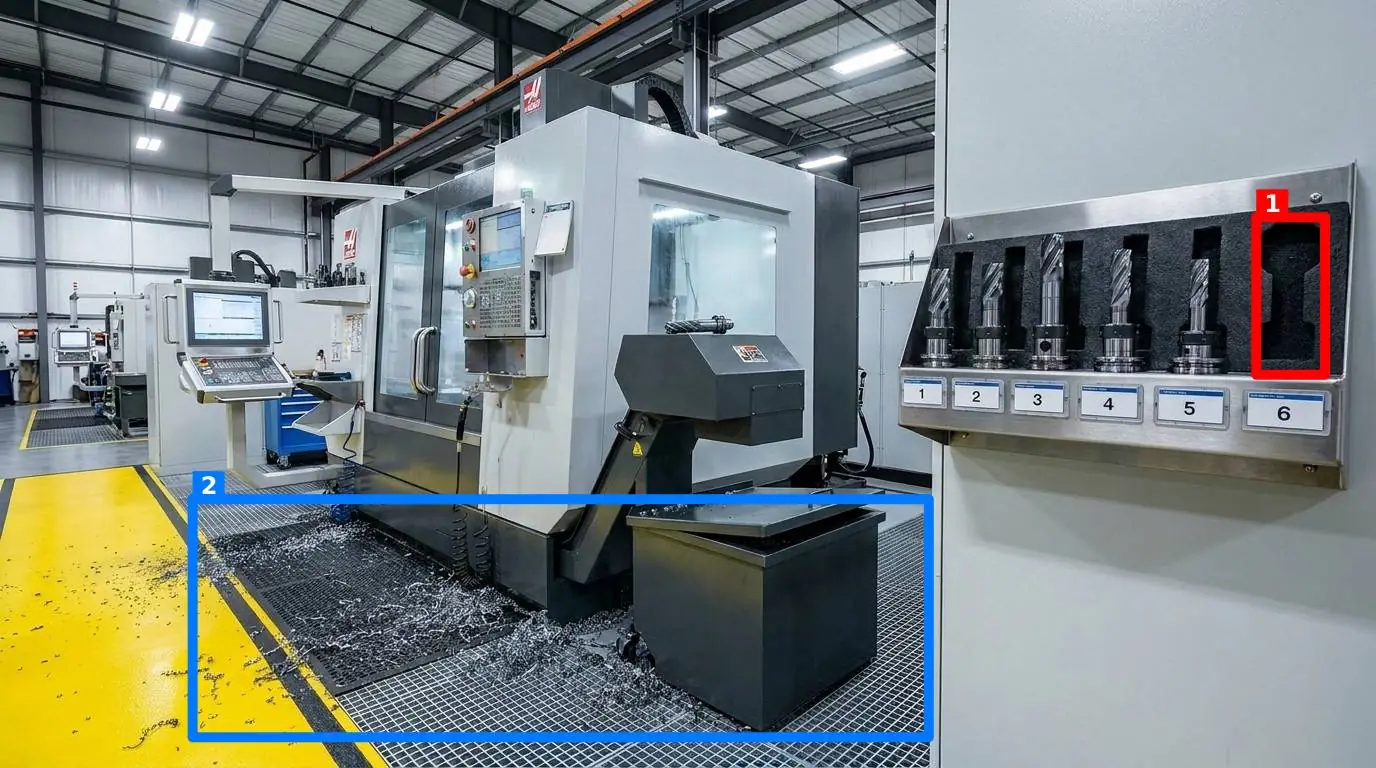
Visual controls are the foundation of lean manufacturing. When you walk into a world-class facility, you do not need to read a manual to know if something is wrong. You see it instantly. Yellow floor tape outlines where pallets belong. Shadow boards show exactly which tool is missing. Your safety inspections should operate on the same principle. Instead of asking an inspector to read a long list of instructions, show them what the station must look like. For example, on manufacturing and production floors, safety is a direct consequence of organization. If a torque wrench is left on a walkway or a safety guard is left unbolted, it is a physical hazard.
When you implement visual standards, you also make it easier to enforce housekeeping methodologies like 5S or 6S. If you are debating how to structure your program, our analysis on 5S vs 6S: Does Adding Safety Actually Improve Your Floor? explains how integrating safety into daily visual checks prevents standards from slipping over time. A visual inspection system ensures that a place for everything and everything in its place is not just a slogan on a poster, but an audited, daily reality.
How Visual AI Auditing Works in Practice
This is where modern technology can bridge the gap. Instead of forcing your team to fill out forms, you can use a visual-first tool like SnapAudit to turn safety audits into a two-second task. The workflow is designed to eliminate friction. First, the manager defines specific control points—such as a chemical storage cabinet or an emergency exit. For each point, the manager takes one reference photo showing the area in its compliant state. When a worker conducts a round, they do not need to download an application. They simply open a link in their phone’s browser and take a live photo. The AI instantly compares the fresh photo against the reference photo, scores the station out of 100, provides a short message, and draws colored boxes directly on the image around any detected problems.
Depending on the station, the manager can toggle five specific criteria on or off: the presence of required items, general cleanliness, clutter, correct position, and correct orientation. This ensures that a fire extinguisher station is checked for presence and position, while a cleanroom doorway is checked strictly for clutter and cleanliness. To make floor walks efficient, individual control points can be grouped into a single round, allowing an inspector to cover an entire department in one systematic walkthrough. To protect the integrity of your data, the system automatically verifies photo freshness using the image's metadata. This prevents workers from taking one good photo on Monday and re-submitting it every day for the rest of the week—a common workaround with traditional digital checklists.
Managing Safety Without Creating an Administrative Burden
A safety program is only as good as its feedback loop. If a safety hazard is identified but the notification sits in an inbox for three days, the risk remains on the floor. At the same time, managers do not have the time to log into a dashboard every hour to check on compliance. To solve this, inspection results must go directly to the people who can act on them. Once a photo is submitted and scored, the results can be delivered instantly via email and Telegram to the specific distribution list for that area. This includes supervisors, maintenance techs, or safety officers who may not even have an account in the system. If a fire exit is blocked on Loading Dock B, the dock supervisor gets a Telegram message with a photo showing the exact box blocking the door. They do not need to log into a software suite; they just need to move the box.
Over time, this visual data builds a historical record for every control point. Managers can access a Pareto view of recurring issues to see which stations are chronic offenders. If the same assembly line consistently scores low on clutter, it may indicate a deeper layout issue or a lack of proper storage, allowing you to make targeted improvements rather than repeatedly lecturing the team. This systematic approach is detailed further in our guide on Enforcing 5s Safety Standards Without Paperwork Fatigue, which outlines how to maintain high standards without burning out your supervisory staff.
Your First Step Toward Visual Safety Standards
If you want to move away from unreliable paper checklists and complex apps, you do not need to overhaul your entire facility overnight. In fact, trying to digitize every corner of a multi-site operation at once is a guaranteed way to trigger employee resistance and project failure. Instead, start with a highly focused, high-impact pilot program. First, identify three high-risk zones where safety violations are both common and dangerous. Good candidates include your primary emergency exit pathways, the main electrical panel clearances, or a high-traffic forklift charging station. Second, establish the visual standard by cleaning those areas until they are in perfect compliance, then take one clear reference photo of each zone. This photo is now your contract with the floor.
Next, set up your verification system using a visual audit tool to register these three control points. Ensure the notification list is set to alert the immediate area supervisors. Have the shift leads photograph these three zones at the start of every shift. Do not ask them to fill out forms; just require the photo. After two weeks, review the history. Did the electrical panel remain clear? Did the AI flag recurring clutter? Use this real-world feedback to adjust your visual standards before scaling the system to the rest of the facility. By focusing on physical proof rather than administrative compliance, you build a culture where safety is visible, measurable, and undeniable. To see how simple it is to set up your first visual control point and review our transparent pricing, visit our pricing page and start transforming your floor walks today.