Enforcing 5's Safety Standards Without Paperwork Fatigue
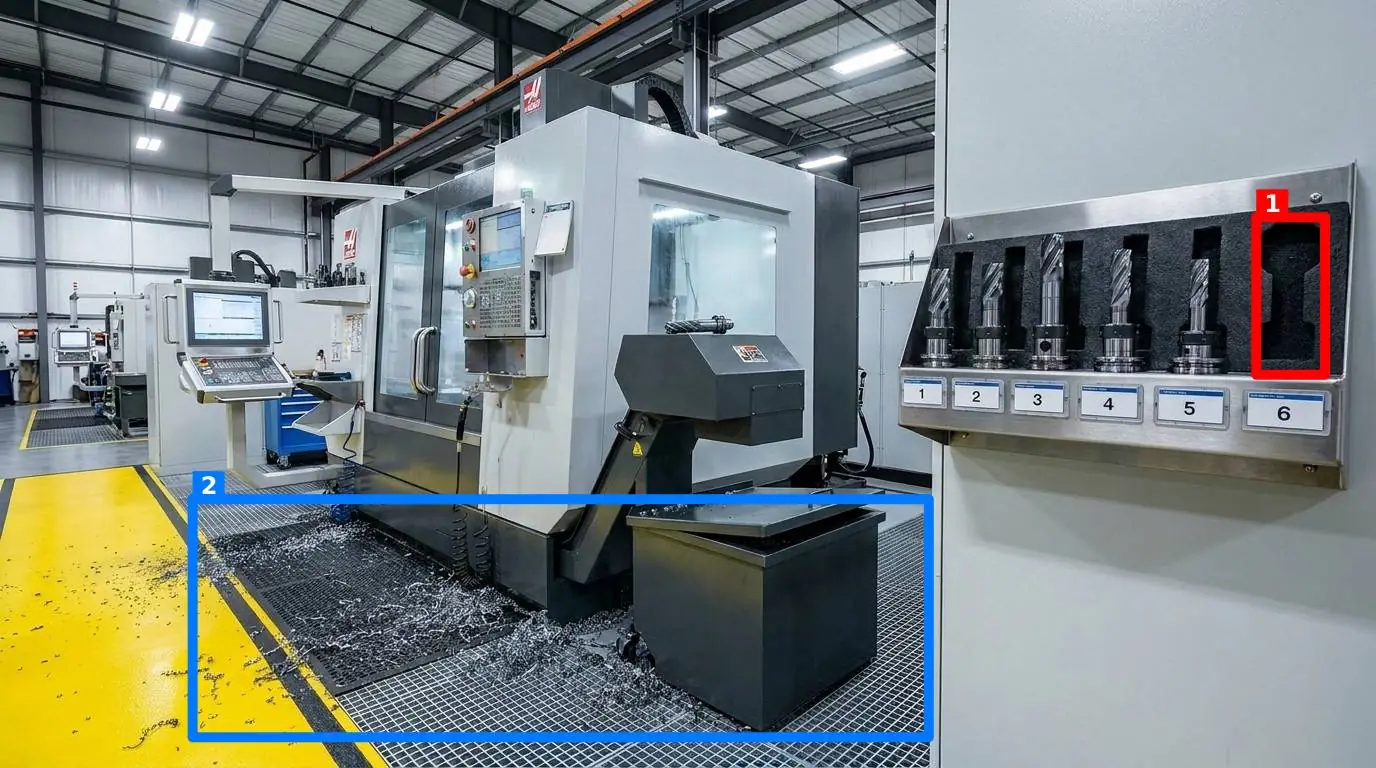
You walk the floor. You see a torque wrench sitting on top of an electrical cabinet instead of its designated shadow board. A fire door is propped open with a wooden wedge to let a breeze in. A mop bucket sits in the middle of a high-traffic walkway, waiting for someone to trip over it. You have run these walkthroughs for years, likely using a clipboard with a laminated sheet or a basic checklist app that makes workers tap "Yes" fifty times without looking.
This is the daily struggle of maintaining 5's safety. While the classic Japanese methodology focuses on sorting, setting in order, shining, standardizing, and sustaining, the ultimate goal on a busy floor is always about keeping people safe while keeping production moving. When we try to enforce 5's safety through sheer administrative willpower, we run into a wall of human nature. Workers want to hit their production targets, and filling out tedious compliance forms feels like a distraction from the real work.
The Hidden Friction of Traditional Audits
Walkthroughs are supposed to prevent incidents, but they often turn into a bureaucratic exercise. When you walk a busy line, you are looking for specific deviations: grease spots on the floor, misaligned safety guards, or personal protective equipment (PPE) left on a workbench instead of in a locker. But if your audit system relies on a worker checking off thirty boxes, they will inevitably take shortcuts.
This is why many operations leads are highly skeptical of digital checklist tools. A digital checklist is just a paper checklist on a screen; it does not change the underlying behavior. If anything, it makes it easier to cheat. A worker can tap through a screen in thirty seconds while sitting in the breakroom. This disconnect between the audit trail and the physical reality of the floor is what we call the "checklist lie." If you want to dive deeper into why this happens, you can read about why your 5S audit checklist lies to you.
The Practical Challenges of Enforcing 5's Safety on the Floor
To make this methodology work, you must define exactly what "clean and organized" means for every single workstation. It cannot be subjective. If you tell a shift worker to "clean up the packaging area," their definition of clean will be different from yours, and different from the next shift's supervisor.
For example, on a busy manufacturing and production floors, a standard must be visual. A shadow board shows exactly where the ball-peen hammer and the adjustable wrench go. A taped outline on the floor shows where the pallet jack must be parked when not in use. If a tool is missing, the empty shadow is the immediate indicator.
But how do you audit this without spending two hours of your day walking around with a clipboard? If you are managing multiple facilities, you cannot be everywhere at once. You need a way to verify that the standard is being met without having to physically inspect every corner yourself. This is where visual verification changes the game.
The Five Core Visual Criteria That Matter
When auditing a workspace visually, you are looking for five specific deviations. Let's break down these criteria and how they relate to maintaining an orderly environment.
- Presence: Are the required items actually there? For instance, is the fire extinguisher in its bracket? Is the first-aid kit stocked and mounted? If a station requires a specific torque wrench to calibrate fasteners, is that wrench present?
- Cleanliness: Is the area free of dirt, oil, and debris? A leak from a hydraulic line on a CNC machine is not just a maintenance issue; it is a slip hazard waiting to happen.
- Clutter: Are there foreign objects in the workspace? A cardboard box left on top of an electrical panel, or lunch wrappers left on a workbench, are classic examples of clutter that degrade safety.
- Position: Is everything in its designated zone? Floor markings are there for a reason. If a trash bin is pushed two feet to the left, it might block the egress path for a forklift.
- Orientation: Are tools and equipment facing the right way? A valve handle must be oriented so that it can be quickly turned off in an emergency. A safety sign must be facing forward, not turned toward the wall.
By focusing on these five dimensions, you can convert vague instructions like "make it look good" into hard, objective rules. This is how you keep 5S Lean Six Sigma standards from slipping over time, especially during shift handovers when the pressure to produce is at its highest.
Setting Up a Visual Standard That Actually Works
To make these audits actionable, let's look at a concrete reference table of how to define control points and audit them effectively. Below is a framework you can implement on your floor today:
| Control Point | Common Failure Points | Visual Standard Requirement | Safety Risk |
|---|---|---|---|
| Assembly Bench 4 | Pliers left on bench, loose zip ties, grease on surface | Shadow board fully populated, surface wiped down | Foreign object damage, slip hazards |
| Emergency Exit Door | Propped open with wood block, pallets stacked in front | Door closed, yellow floor hatch completely clear | Blocked egress during fire or evacuation |
| Chemical Storage Cabinet | Bottles unlabeled, secondary containment dirty | All bottles upright, labels facing out, containment dry | Chemical reaction, inhalation hazards |
| Battery Charging Station | Cables on floor, water levels unchecked, PPE missing | Cables hung on hooks, safety goggles in designated bin | Tripping hazard, electrical short, acid burns |
When you define your floor this way, you are creating control points. A control point is any station, shelf, machine, or doorway where order directly impacts safety and throughput. Instead of auditing the whole room, which is overwhelming and vague, you audit the specific control points that matter.
How to Keep Standards from Slipping Without Micro-managing
As an operations lead, you do not have time to chase people down to make sure they put their tools away. And your workers do not want another complicated software tool to learn. This is where a highly focused tool like SnapAudit fits into the workflow.
Instead of filling out long forms, a supervisor or worker simply takes a photo of a control point. The setup is remarkably straightforward: as a manager, you define your control points (such as a specific workbench or an emergency exit) and take one reference photo of each showing exactly how it should look when perfect. When it is time for a walkthrough, the worker opens the site in their phone browser—meaning there is no app to install—and takes a quick photo of the station.
The system's AI then compares the two photos. It returns a score out of 100, a short message for the worker, and colored boxes drawn directly on the photo around each detected problem. You can toggle any of the five criteria—presence, cleanliness, clutter, position, and orientation—on or off for each specific point depending on what matters there. These points can be grouped into a single cohesive round, allowing a worker to complete an entire area walkthrough in under two minutes.
Because accuracy is critical, the system checks photo freshness using the image metadata. This ensures that an old, clean picture cannot be re-submitted to bypass today's check. Once the round is done, the results are sent immediately via email and Telegram to the notification list for that room. This means even team members without an account get instant visibility into the state of the floor. Over time, you get a historical log per point and a Pareto view of which problems recur most frequently, allowing you to address systemic issues rather than just firefighting daily symptoms. This approach respects the worker's time and gives you verifiable proof of the state of your floor. If you want to compare how this visual-first methodology stacks up against old-school checklist platforms, you can see how this compares with SafetyCulture and other traditional systems.
A Step-by-Step Transition Plan
If you are ready to move away from paper checklists that lie to you, do not try to overhaul your entire facility overnight. That is a recipe for pushback and failure. Instead, take a structured approach:
- Identify your three highest-risk control points. This might be an emergency exit that frequently gets blocked, a tool station that is always messy, or a critical machine that requires strict cleanliness to operate safely.
- Establish the visual standard. Physically clean and organize those three points. Take a high-quality reference photo of each when they are in their ideal state. This becomes your source of truth.
- Train the team on the Why. Explain that the goal is safety and efficiency, not micromanagement. Show them how quick it is to snap a photo instead of writing a report.
- Run a visual-first trial. Have the team photograph those three points at the end of every shift for two weeks. Use the automated feedback to coach them on maintaining the standard.
- Review the Pareto data. Look at the history of those points. If the same workbench is constantly flagged for clutter, ask why. Is there a lack of storage? Is the trash bin too far away? Fix the root cause.
By starting small, you prove the value of visual verification to both management and the front-line workers. You can learn more about managing these processes effectively by reading our guide on audit and inspection management software or exploring how to manage specific areas like auditing warehouse stations effectively.
Maintaining high standards on the floor does not require complex workflows or administrative overhead. It requires clarity, speed, and a commitment to visual truth. When you make the standard visual, you make it impossible to ignore.