How to Keep 5S Lean Six Sigma Standards From Slipping
The Entropy of the Shop Floor
The shift ends, the machines wind down, and you walk the floor. It takes less than thirty seconds to spot the drift. A heavy torque wrench sits on top of a greasy rag on a workbench instead of its labeled shadow board. A fire door at the back of the bay is propped open with a wooden wedge. In the main assembly aisle, a yellow mop bucket sits abandoned, creating a clear trip hazard. You spent weeks training your team on 5S Lean Six Sigma principles, yet within forty-eight hours of your last formal walkthrough, the shop floor has quietly reverted to its natural state of disorder.
This is the daily reality of managing operations. Standards do not fail because your people do not care; they fail because maintaining them requires constant, exhausting vigilance. When a supervisor is focused on hitting production quotas or resolving a machine breakdown, checking the exact placement of trash bins and safety glasses feels like administrative noise. To make your standards stick, you need to bridge the gap between high-level policy and the daily, physical reality of the floor.
Why Traditional Checklists Fail the 5S Lean Six Sigma Audit
Most operations leads attempt to solve this problem by introducing more documentation. They write detailed standard operating procedures (SOPs), print out laminated sheets, or build digital forms. But on a busy production floor, these checklists quickly turn into a pencil-whipping exercise. A worker or supervisor, hurried by the pressure of the shift, scrolls through twenty yes-or-no questions and taps "Yes" to all of them without actually inspecting the station. As we explore in our analysis of why checklist software fails on the shop floor, these text-heavy systems often turn into a passive routine.
"Is the workbench clean?" is an entirely subjective question. To a tired operator, "clean" might mean they wiped the worst of the grease off the center. To a quality manager, it means zero metal shavings, no stray bolts, and tools returned to their exact locations. When you rely on text-based checklists, you invite variance. Every person who conducts an audit brings their own interpretation of the standard. This variance is the exact opposite of what a robust manufacturing floor audit is designed to achieve. To eliminate this subjectivity, you must transition from written instructions to visual control.
The Five Visual Pillars of Station Control
Visual management relies on the brain's ability to process images instantly. Instead of asking an operator to read a list of rules, you show them what "perfect" looks like. When auditing a workstation, a machine, or a common area, you should evaluate the space against five distinct visual criteria. These criteria represent the core of physical workplace organization and can be easily verified by comparing the current state of a station against an established standard.
| Visual Pillar | Subjective Checklist Question | Objective Visual Criteria |
|---|---|---|
| Presence of Required Items | Are all tools present? | Are all designated shadow-board slots filled with the correct tools? No empty spots allowed. |
| Cleanliness | Is the station clean? | Are surfaces free of grease, dust, metal shavings, and discarded packaging? |
| Clutter | Is the area free of clutter? | Are there any foreign objects (coffee cups, personal phones, scrap material) in the work zone? |
| Position | Are items in their correct places? | Are mobile carts, trash bins, and pallet jacks aligned perfectly within their taped floor boundaries? |
| Orientation | Are controls set correctly? | Are valves, switches, and tool handles pointed in the designated safe or operational direction? |
By breaking down a station into these five pillars, you remove the guesswork. A supervisor or worker no longer needs to interpret a vague question. They simply look at the physical space, look at the standard, and identify the discrepancies. This visual approach forms the backbone of any sustainable continuous improvement program.
Building a Visual Standard That Actually Sticks
To implement this on your floor, you must build a system that makes the standard impossible to ignore. This does not require complex enterprise software or months of consulting. You can start by defining clear control points across your facility. A control point might be a critical assembly bench, a raw material receiving shelf, a high-maintenance machine, or an emergency exit doorway. For each control point, you establish exactly one reference photo that captures the area in its ideal, compliant state.
This is where modern technology can simplify the process without adding administrative overhead. Rather than printing and laminating hundreds of photos that quickly get covered in oil and dust, you can digitize your standards. Using a visual audit tool like SnapAudit, a manager can define these control points in a central system and upload the single reference photo for each. The reference photo becomes the absolute source of truth for that specific location, accessible instantly when an audit is performed.
Once the standard is digitized, the audit process becomes incredibly straightforward. A worker does not need to install a heavy mobile app or undergo extensive training. They simply open the site in a phone browser, select the station they are standing in front of, and take a photo. This frictionless entry point ensures high compliance because it fits naturally into the worker's existing workflow without disrupting their momentum.
Sustaining the Audit Loop Across Multiple Sites
For operations leads managing multiple facilities, the biggest challenge is maintaining consistency without physically traveling to every site. You need a way to verify that audits are actually happening, that the photos are real, and that problems are being corrected. Traditional HSEQ tools often fail here because they are too complex for daily floor use, as discussed in our guide on why HSEQ management software fails on the floor.
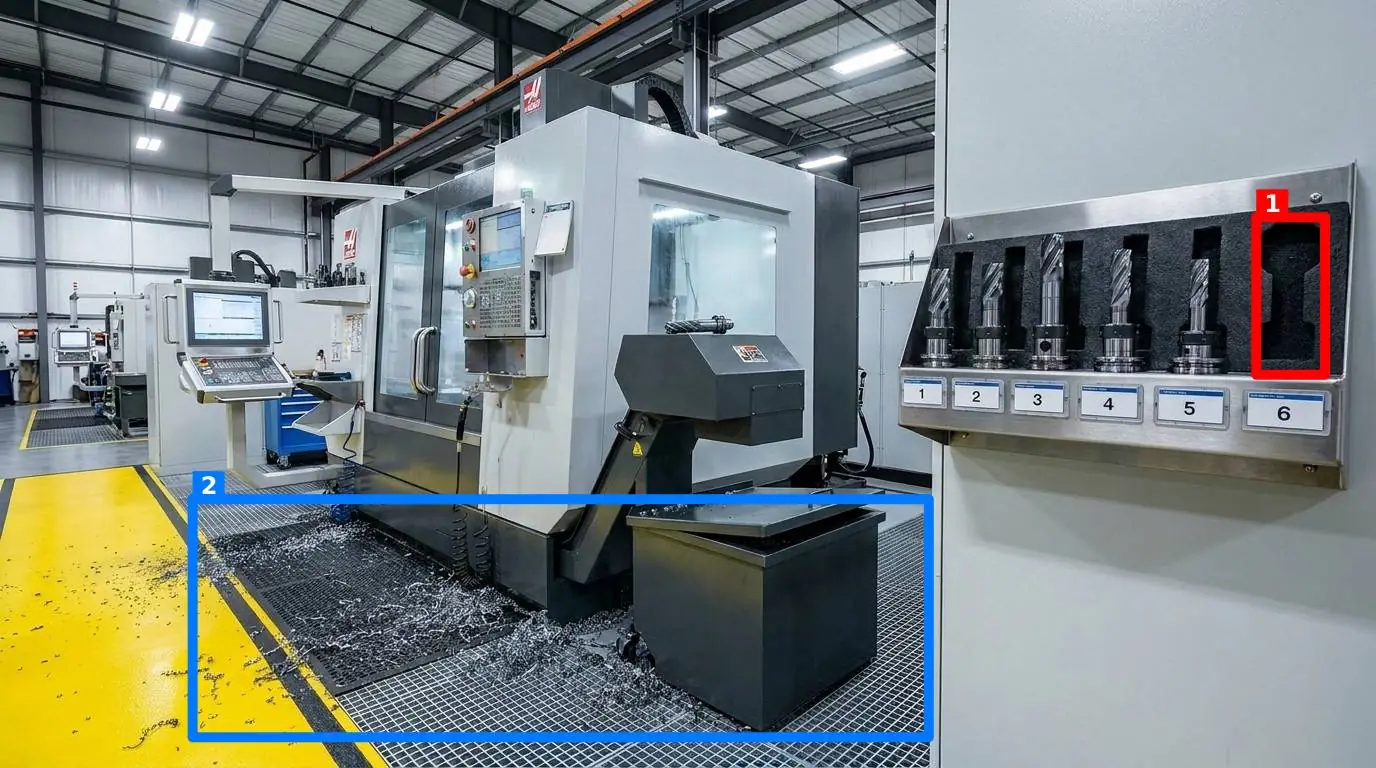
An effective visual audit system must automate the verification process. When a worker submits a photo of a station, an AI compares that photo against your reference image. Within seconds, the system returns a score out of 100, along with a short, direct message for the worker. To make the feedback actionable, the AI draws colored boxes directly on the photo around each identified problem—such as a missing torque wrench or a misplaced trash bin. This instant feedback loop allows the operator to correct the issue on the spot, turning the audit into a teaching moment rather than a punitive exercise.
To prevent shortcuts, the system automatically verifies the freshness of the photo by checking the image metadata. This ensures that an operator cannot simply upload a clean photo taken last month; they must capture the reality of the station today. The results of these visual audits are then sent immediately via email or Telegram to the specific team members responsible for that room—even if they do not have an account in the system. Over time, you build a historical record for every control point, allowing you to view a Pareto chart of recurring issues. If Station 3 consistently fails on cleanliness, or the safety door is repeatedly blocked, you have the hard data you need to address the root cause.
Your First Step: Start with One Bad Station
Do not attempt to roll out a sitewide visual audit program overnight. A massive launch often leads to confusion, resistance, and eventual abandonment. Instead, start small and build momentum by following these practical steps:
- Identify your bottleneck: Pick one workstation or area that is consistently disorganized, has high error rates, or frequently fails safety checks.
- Establish the ideal state: Work with the operators at that station to clean, organize, and optimize the layout. Once it is perfect, take a single, clear reference photo.
- Run a daily trial: Have the shift supervisor or the operator take a daily photo of the station using their phone browser. Use the AI feedback to score the station and highlight deviations.
- Review the data: After two weeks, review the historical trends and Pareto chart for that station. Identify which of the five pillars (such as clutter or position) is failing most often, and adjust the physical layout or training accordingly.
Once you have proven the value of visual audits at a single station, you can easily scale the process across the rest of your facility and other sites. By replacing subjective checklists with clear, visual feedback, you turn your standards from a forgotten policy into a daily, self-sustaining habit on the shop floor.