Why Checklist Software Fails on the Shop Floor
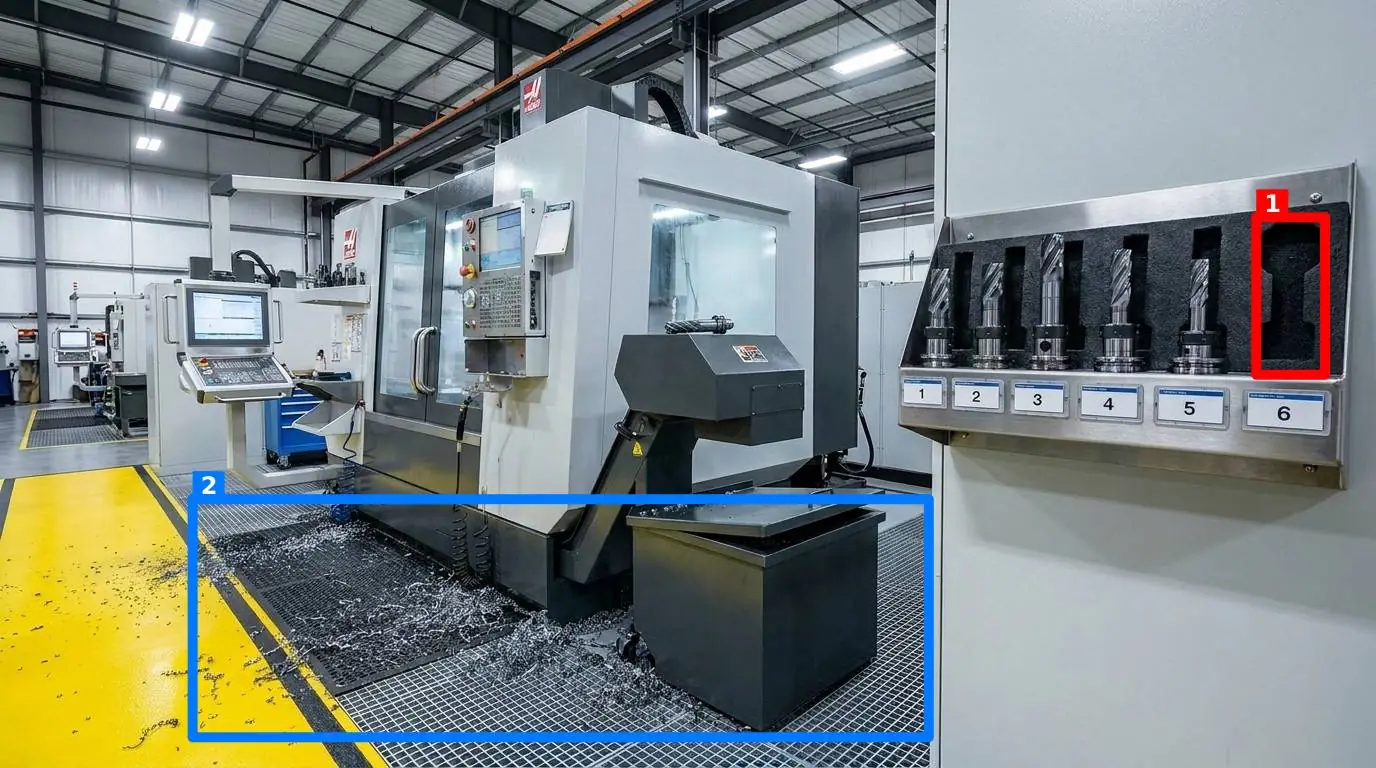
Every morning, the shift starts with a walkthrough. If you manage a manufacturing line, a distribution center, or a commercial kitchen, you know the routine. You or your team walk the floor with a clipboard or a tablet, ticking off boxes. But there is a quiet friction between what the record says and what the floor actually looks like. You find a mop left in a walkway, a torque wrench missing from its shadow board, or an expired lot on a prep shelf, yet the digital record shows a perfect row of green checkmarks.
The truth is that standard checklist software often fails because it relies entirely on the honesty and attention span of a tired operator. When a worker has to tap Yes forty times on a phone screen at the end of a long shift, the checklist becomes an administrative chore to be completed as quickly as possible, rather than a tool for quality control. Pencil-whipping did not disappear when we moved from paper to screens; it just became faster. To keep your operation running safely and efficiently across multiple sites, you need a method of verification that does not rely on subjective interpretations or blind trust.
The Core Flaw of Text-Based Verification
Text-based checklists are inherently subjective. When a task asks, "Is the workstation clean and organized?", the word "clean" is open to interpretation. To a seasoned shift supervisor, clean means the workbench is wiped down, tools are placed back on their shadow boards, and trash is emptied. To a temporary worker hired three days ago, clean might simply mean there are no large cardboard boxes blocking the immediate workspace.
This subjectivity creates variance. In operations, variance is the enemy of quality. If you are managing five, fifty, or two hundred sites, you cannot personally verify what "clean" means at every location every day. When you rely on standard checklist software, you are not auditing the physical state of your facility; you are auditing your team's willingness to tap a button.
Consider a fire door. A checklist might ask, "Are all emergency exits clear?" A worker glances toward the door, sees that there are no pallets directly in front of it, and taps "Yes." They might not notice that a trash bin is propped against the door latch, preventing it from opening fully in an emergency. The text prompt did not force them to look closely. It only forced them to answer.
Why Traditional Checklist Software Cannot Verify Reality
Most digital audit tools on the market are built on the legacy of the paper clipboard. They take the same list of questions, put them into a database, and display them on a mobile screen. While some teams try to adapt comprehensive checklist software designed for enterprise safety audits, the fundamental issue remains: it still relies on manual data entry.
When a checklist requires manual entry, it creates several operational bottlenecks:
- Time consumption: Tapping through dozens of questions takes time away from actual production or maintenance work.
- Lack of context: A simple "No" on a checklist does not tell you how bad the problem is. Is the floor slightly damp, or is there a major oil leak under the conveyor?
- No historical visual record: When a quality issue arises three weeks later, you have no way of seeing what the station actually looked like on the day of the audit.
If you are responsible for maintaining standards across manufacturing and production floors or busy warehouses and distribution centres, you need a system that captures objective reality, not subjective opinions.
The Visual Alternative: Show, Do Not Tell
The alternative to text-based checklists is visual auditing. Instead of asking a worker to read a question and make a judgment call, you ask them to document the actual state of the workspace. This changes the dynamic entirely. A photograph does not lie, and it does not have a subjective opinion.
In a visual audit system, the manager defines specific control points across the facility. A control point might be an assembly station, a storage shelf, a critical machine, or an emergency exit doorway. For each control point, the manager takes one reference photo that shows exactly how that point should look when it is in perfect condition.
When it is time to perform an audit, the worker does not need to install a heavy application. They simply open a link in their phone browser, stand in front of the control point, and photograph the area.
This is where AI changes the workflow. Rather than forcing a manager to manually review hundreds of photos every day, AI compares the newly taken photo against the reference photo. It evaluates the image based on five criteria that the manager can toggle on or off per point:
- Presence: Are all required items, such as safety glasses or specific tools, present?
- Cleanliness: Is the surface free of spills, dust, or debris?
- Clutter: Are there unauthorized items left on the station?
- Position: Are items placed in their designated zones?
- Orientation: Are tools and equipment facing the correct way for the next shift?
The AI then returns an objective score out of 100, displays a short message for the worker on their screen, and draws colored boxes directly on the photo around each detected problem. The worker gets instant feedback, showing them exactly what needs to be corrected before they leave.
Comparing Checklist Software with Visual Audits
To understand how this shifts the daily routine on the shop floor, let us look at how common operational issues are handled under both systems:
| Audit Element | Text Checklist Approach | Visual Comparison Approach |
|---|---|---|
| Housekeeping & Cleanliness | Subjective "Is it clean?" checkbox. Often marked "Yes" regardless of minor spills. | AI compares cleanliness against reference photo and flags specific foreign debris. |
| Tool Placement | Manual check of shadow board. Worker must verify every tool is in place. | Camera captures the whole board; AI flags missing items instantly with colored boxes. |
| Safety Hazards | Ticking "No blockages" on fire doors. Easy to overlook propped-open latches. | Image comparison flags any obstruction or incorrect door position instantly. |
| Reporting & History | Aggregated "Yes/No" percentages that hide the true visual state of the floor. | Pareto view of recurring visual problems per point with full historical records. |
Managing Multiple Sites Without Leaving Your Desk
For operations leads and quality managers overseeing multiple locations, the biggest challenge is visibility. You cannot be in five places at once, let alone fifty. Traditional audit and inspection management software generates endless spreadsheets of compliance percentages, but these numbers rarely reflect the actual conditions on the ground.
With a visual system, you gain a direct window onto every shop floor. Because points can be grouped into a round, a worker can complete a walkthrough of an entire department in a few minutes, simply by taking a series of photos.
To prevent workers from taking shortcuts, such as photographing a clean station once and re-submitting the same image day after day, the system automatically verifies photo freshness using the image metadata. If someone tries to upload an old photo, the system flags it.
Once a round is completed, the results are delivered instantly by email and Telegram to the notification list for that specific room. This means shift supervisors and local managers receive the visual report immediately, even if they do not have an account in the system. They see the score, the colored boxes, and the exact issues that need attention.
Over time, the system builds a visual history for every single control point. This history is aggregated into a Pareto view, showing you exactly which problems recur most frequently. If a specific station consistently fails due to clutter on Tuesday afternoons, you have the visual evidence to investigate why that specific shift is struggling to maintain the standard.
How to Transition Your Floor to Visual Audits
If you want to move away from unreliable text checklists and build a culture of real accountability, you do not need to overhaul your entire operational framework overnight. You can start small and scale up as your team gets comfortable with the process.
- Select three critical control points: Choose areas where variance is common or safety is critical, such as a packing station, a tool shadow board, or an emergency exit.
- Establish the "perfect state": Clean, organize, and set up these three points exactly how they should look.
- Capture your reference photos: Take one clear photograph of each point in its perfect state.
- Set up your visual audit tool: With a tool like SnapAudit, you can upload these reference photos, toggle the specific criteria you want to check, and generate browser links for your team.
- Run a pilot: Have your operators take a photo of these points at the end of every shift. Review the automated scores and the Pareto history at the end of the week.
To see how this visual approach can be integrated into your operations within your budget, you can check our pricing details for more information. By replacing subjective checkboxes with objective visual evidence, you stop guessing what is happening on your floor and start seeing it.