Why HSEQ Management Software Fails on the Floor
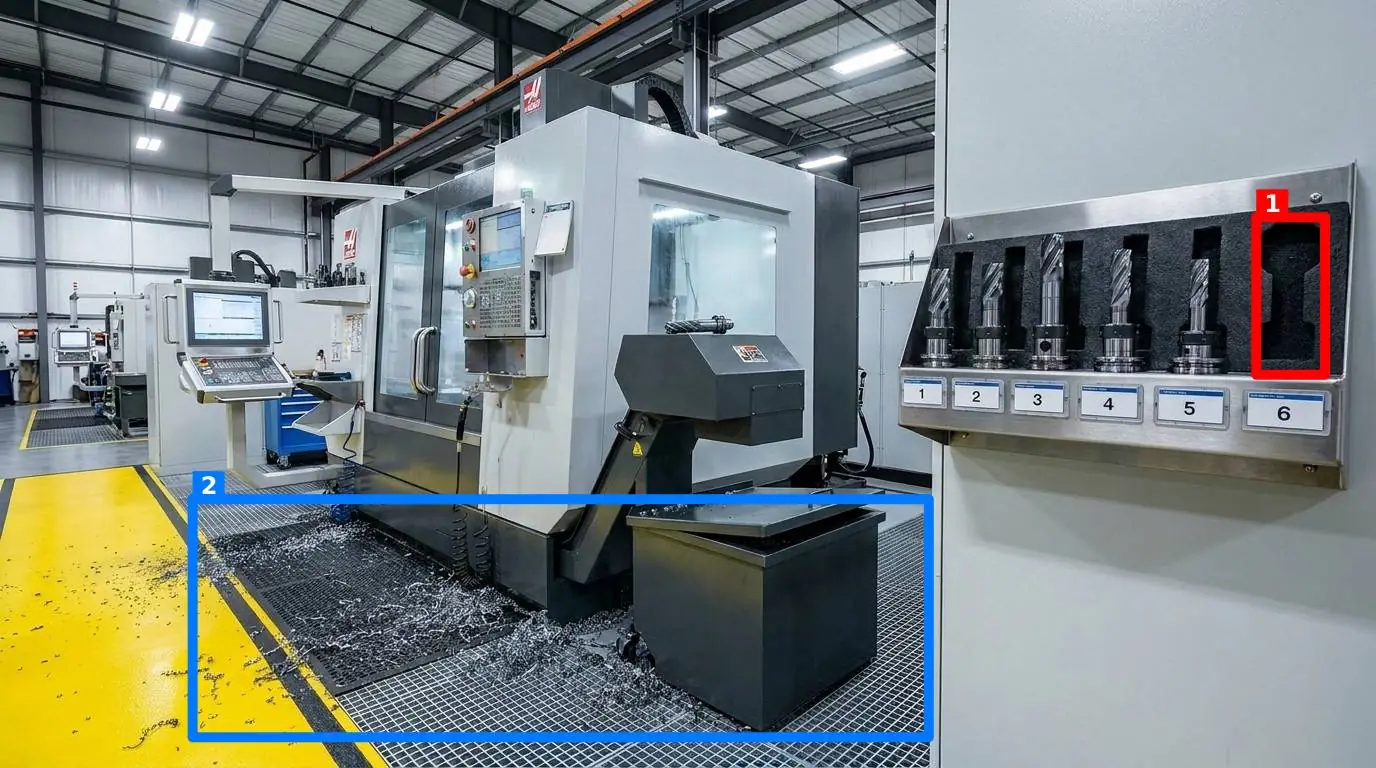
If you walk your floor today, you will likely find a discrepancy between what your digital checklist says and what is actually happening. The paper form says the fire door is clear; you walk by and find a pallet of incoming stock blocking it. The digital safety app says the chemical station is clean; you find a container of solvent sitting without its cap. This is the reality of the floor. Shift supervisors and quality managers do not need more forms. They need a way to make standards stick.
When companies search for hseq management software, they are often sold complex enterprise platforms designed for the boardroom, not the shop floor. These systems excel at generating colorful charts for quarterly reviews, but they do nothing to help the operator who is trying to clear their station before the next shift. To build a culture of compliance, we must bridge the gap between the digital record and the physical workstation on manufacturing and production floors.
The Checklist Illusion: Why Your Current Audits Aren't Working
Most operations managers are running some form of walkthrough today. Whether it is a clipboard with a photocopied sheet or a modern form-based application, the underlying mechanism is the same: a list of questions that require a binary 'yes' or 'no' response. Over time, this mechanism inevitably breeds 'pencil whipping'. Workers, pressed for time at the end of a long shift, will check 'yes' for twenty items in a row without looking closely at a single one.
Consider the physical reality of a busy facility. A torque wrench is supposed to be returned to its specific shadow board at the end of every run. A mop is left dripping in a high-traffic walkway instead of being hung in the janitorial closet. An expired lot of ingredients sits on a food prep shelf because the worker missed the date code on the box. These are not failures of intent; they are failures of focus. A checklist does not help an operator see what is wrong; it merely asks them to confirm that everything is right. The cognitive load of reading twenty questions and evaluating each one manually leads to fatigue and oversight.
The Structural Friction of Traditional HSEQ Management Software
To solve this, many organizations invest heavily in enterprise audit and inspection management software. However, these tools often introduce more friction than they resolve. They are built on the assumption that more data is always better, resulting in complex setups that require user training, corporate logins, and IT department sign-offs.
When you compare these heavy systems to simpler, visual-first approaches, the differences become clear. If you look at how this compares with SafetyCulture and other traditional checklist apps, you find that the administrative overhead often kills worker adoption. If an operator has to download a heavy native application to their personal phone, remember a complex corporate password, navigate three sub-menus, and type out a detailed text explanation of a dirty workstation, they will avoid doing the audit. They might complete it when the supervisor is watching, but it will never become an integrated part of their daily routine. For software to work on the floor, it must require zero installation and take less than ten seconds to use.
The Visual Standard: Show, Don't Tell
The alternative to a long checklist is a visual standard. Humans are highly visual creatures; we can spot a discrepancy in a picture instantly, even if we cannot articulate the exact rule being broken. By moving the focus of your audits from text-based questions to photographic comparison, you eliminate the ambiguity of written standards.
This is where a tool like SnapAudit changes the dynamic. Instead of writing a detailed ten-point cleaning instruction for an assembly station, a manager defines a 'control point'—which could be a workbench, a storage rack, or a doorway—and takes one reference photo showing exactly how that point should look when it is perfectly compliant. To perform an audit, a worker simply opens the site in their phone browser, takes a photo of the station, and submits it. There is no app to install. The AI compares the two photos and immediately returns a score out of 100, a brief message for the worker, and colored boxes drawn directly on the photo around any identified problems.
By replacing a list of abstract questions with a direct visual comparison, you remove the subjective element of auditing. A station is either compliant with the reference photo, or it is not. While the AI highlights discrepancies, a person still decides what those results mean for overall compliance.
The Five Criteria of Visual Compliance
To make visual audits objective and repeatable, the comparison must look at specific, controllable aspects of the environment. A high-quality visual audit system evaluates five core criteria, which can be turned on or off depending on the specific control point:
- Presence of required items: Verifying that critical tools, safety equipment, or signs are where they belong (for example, ensuring a fire extinguisher is mounted on its bracket).
- Cleanliness: Detecting spills, dust, trash, or unexpected debris on work surfaces and floors.
- Clutter: Identifying unauthorized objects, loose parts, or personal items that do not belong in the designated work area.
- Position: Checking if mobile equipment, such as waste bins or pallet jacks, are parked inside their taped floor boundaries.
- Orientation: Verifying that switches, valves, or physical components are set in the correct direction.
By configuring these criteria per control point, you can tailor the audit to the exact risks of that area. A cleanroom station might have strict cleanliness and presence rules enabled, while a loading dock in warehouses and distribution centres might focus primarily on clutter and position.
| Audit Element | Traditional Checklist Audit | Visual Verification Audit |
|---|---|---|
| Setup Time | Hours spent writing detailed questions and formatting forms. | Minutes spent taking a single reference photo of a compliant station. |
| Worker Friction | High. Requires reading, typing, and navigating menus. | Low. Requires opening a phone browser and taking one photo. |
| Objectivity | Low. Subject to the operator's personal interpretation of 'clean'. | High. AI compares the physical reality against the visual standard. |
| Actionable Feedback | Delayed. Reports must be compiled, exported, and emailed. | Instant. Visual boxes show the operator exactly what to fix on the spot. |
Managing the Floor Without the Admin Burden
An audit program is only as good as the action it prompts. If audit results sit in a database that only the quality manager can access, the floor will never improve. For a system to be effective across multiple sites, the loop must close automatically, delivering information directly to the people who can act on it immediately.
Instead of relying on a centralized dashboard that supervisors have to remember to check, results should be pushed out to where work happens. For example, control points can be grouped into a single round so that an operator can complete a walkthrough of an entire department in a few minutes. Once the round is done, the results are delivered via email and Telegram to the notification list for that specific room. This means the shift supervisor or maintenance technician receives the visual report instantly on their phone, even if they do not have an account in the system.
Furthermore, an audit system must have built-in safeguards to maintain data integrity. To prevent workers from simply taking a picture of a clean station once and re-submitting it every day, photo freshness is checked directly from the image metadata. If an old picture is uploaded, the system flags it. Over time, as these photos are collected, the system builds a history for each control point and generates a Pareto view of recurring problems. This allows managers to identify which stations are constantly falling out of compliance, highlighting where physical redesign or additional operator training is required.
How to Begin Transitioning Your Floor Today
Transitioning from a paper-heavy or complex software-heavy system to a visual standard does not require a massive IT project or months of planning. You can start small and scale as your team gets comfortable with the process.
- Select your pilot area: Choose one department, assembly line, or storage area that consistently struggles with organization or compliance.
- Define your control points: Identify three to five critical areas within that pilot zone. This could be a tool shadow board, a packing station, or a safety corridor.
- Establish the visual standard: Clean the area perfectly, organize the tools, and take one clear reference photo of each point. This is your target standard.
- Deploy the workflow: Have your team perform their daily rounds by simply opening their phone browsers and snapping a photo of each control point.
By focusing on visual proof rather than text checklists, you will immediately notice a shift in how standards are maintained. The ambiguity is gone, the feedback is instant, and the administrative burden disappears. If you are ready to simplify your floor audits and move away from complex checklists, explore our visual audit platform at SnapAudit and view our straightforward plans on our pricing page.