The Hidden Flaws in Food Safety Audits Checklists
The Pencil Whip Problem on the Prep Line
Walk into any commercial kitchen during the afternoon prep lag, and you will likely see a familiar ritual. A line cook stands near the handwashing station, clipboard in hand, quickly scratching checkmarks down a photocopied sheet. Or perhaps they are tapping "Yes" on a tablet screen ten times in rapid succession. They are completing the daily walkthrough. According to the record, every sanitizer bucket is at the correct concentration and every prep table is sanitized. But if you look closely, a mop bucket sits directly in the walkway, a personal beverage container rests on the clean prep line, and an expired lot of sauce sits on the bottom shelf of the walk-in cooler.
The reality is that traditional food safety audits checklists often measure compliance with the act of auditing, not the physical state of the kitchen. When a shift leader is managing a busy lunch rush, a checklist is treated as an administrative hurdle to clear as quickly as possible. This is "pencil whipping," which is the systematic verification of inspection records to show perfect compliance without anyone actually looking at the floor. It is not born out of laziness; it is a survival mechanism for busy teams operating under high-pressure conditions. For operations leads and quality managers overseeing multiple sites, this gap between the paper standard and the physical floor is a constant source of anxiety. You design rigorous protocols and distribute detailed guides, yet the actual conditions on the line remain highly variable. The traditional tools used to bridge this gap are no longer sufficient to guarantee safety across dozens of locations.
Why Digital Checklists Just Replicated the Paper Lie
When the food service industry transitioned from paper clipboards to digital inspection systems, there was a belief that technology would solve the compliance problem. The theory was simple: putting the checklist on a screen would track completion times and gather instant data. However, digital tools simply made it faster to submit inaccurate information.
A worker does not need to look at a handwashing sink to tap a button confirming it is stocked with soap and paper towels. They can complete an entire twenty-item inspection while sitting in the breakroom. Even when software attempts to force compliance by requiring random photo attachments, the process becomes so tedious that it actively slows down the kitchen staff. Workers find workarounds, taking photos of a clean sink once and reusing it, or taking blurry, useless images to satisfy the requirements. To understand why these systems fail to change behavior on the floor, it helps to examine the fundamental mismatch between administrative software design and kitchen reality, a topic explored in depth in this analysis of why software checklists fail on the floor.
Furthermore, many of these platforms are built as massive, complex databases that require extensive setup and constant maintenance. When comparing traditional checklist systems like those found in SafetyCulture, operators often find that the administrative overhead of managing accounts for high-turnover kitchen staff outweighs the actual utility of the tool. When a platform requires a dedicated administrator just to manage user permissions and reset passwords for line cooks who work two shifts a week, the system becomes a burden rather than a help.
Designing Food Safety Audits Checklists Around Visual Evidence
To build a system that actually reflects the reality of your kitchens, you must move away from subjective, text-based declarations and ground your process in visual evidence. A text-based question like "Is the prep station clean and organized?" is highly subjective. To a line cook, "clean" might mean the flat top is scraped down, even if there are grease splatters on the wall. To a health inspector, that same station is a critical violation.
By shifting the focus of your food safety audits checklists to direct visual comparison, you eliminate subjectivity. You establish a single, unarguable standard for what "clean and organized" actually means. This standard is defined not by a paragraph of text, but by an image of the station in its ideal state.
Consider the difference between a checklist item and a visual standard across these common kitchen control points:
| Control Point | Traditional Checklist Text | Visual Standard Requirement | Common Failure State to Detect |
|---|---|---|---|
| Handwashing Station | Is the sink fully stocked and clear? | Soap dispenser filled, paper towels loaded, basin completely empty of utensils. | Sanitizer bucket or dirty metal insert left inside the sink basin. |
| Raw Meat Prep Line | Are correct boards and knives in use? | Red cutting board in place, raw-prep knife present, allergen knives on magnetic strip. | Green cutting board used for raw protein, or allergen knife left on general prep surface. |
| Walk-In Cooler Shelving | Are foods stored correctly by temperature? | Ready-to-eat foods on top shelves, raw poultry on bottom shelf, all items labeled. | Raw chicken stored above cooked beef, or unlabeled prep containers. |
| Dry Storage Area | Is storage off the floor and clean? | All boxes on wire shelves at least six inches off the floor, no loose debris. | Onion sacks left directly on the tile floor, or open flour bins without lids. |
When you transition to a visual standard, you are no longer asking your staff to interpret instructions. You are asking them to match a picture. This approach simplifies training, particularly in kitchens with high staff turnover or where multiple languages are spoken. It transforms the audit from a policing action into a clear, visual target for the team on shift.
The Administrative Overhead of Traditional Auditing Software
For operations leads running fifty or more sites, the biggest barrier to maintaining quality standards is not a lack of interest from shift managers; it is the sheer volume of administrative friction. When you want to update a standard, such as introducing a new allergen control protocol, the rollout process is notoriously slow. You have to update the paper forms, print them, ship them to sites, or update a complex digital template and hope that every manager syncs their device before their next shift.
This friction is why many quality assurance programs eventually collapse under their own weight. To keep standards high, we must think beyond traditional checklists and rethink quality management tools entirely. The goal should be to reduce the steps required to document a station to the absolute minimum, removing any need for workers to manage complex logins, navigate deep menu trees, or type out long explanations on a greasy phone screen.
A streamlined workflow should require nothing more than a worker pointing a phone camera at a station. If the process of verifying a station takes more than ten seconds, it will not be done consistently during a busy shift. It will be postponed, and eventually, the team will slide back into the habit of completing the entire walkthrough at the end of the day from memory.
A Practical Approach: Visual Auditing Without the Bloat
This is where a tool like SnapAudit changes the dynamic on the kitchen floor. Instead of asking workers to fill out endless forms, the entire process is built around a single, rapid photographic action. It requires no application download, no account creation for the line staff, and is priced transparently as shown in our pricing overview.
The system operates on a straightforward visual comparison model:
1. Define Your Control Points
The kitchen manager identifies the critical areas of the kitchen that must be verified on every shift, such as the line prep station, the walk-in cooler, the dishwashing area, and the chemical storage rack. For each point, the manager takes a reference photo showing the station exactly how it should look when it is fully compliant, clean, and stocked.
2. Group Points into a Walkthrough Round
To make the process efficient, these individual control points are grouped into a single round. This allows a team member to walk through the kitchen, from the back door to the front counter, verifying each station in a logical sequence without jumping between different screens or menus.
3. Instant Visual Feedback via AI
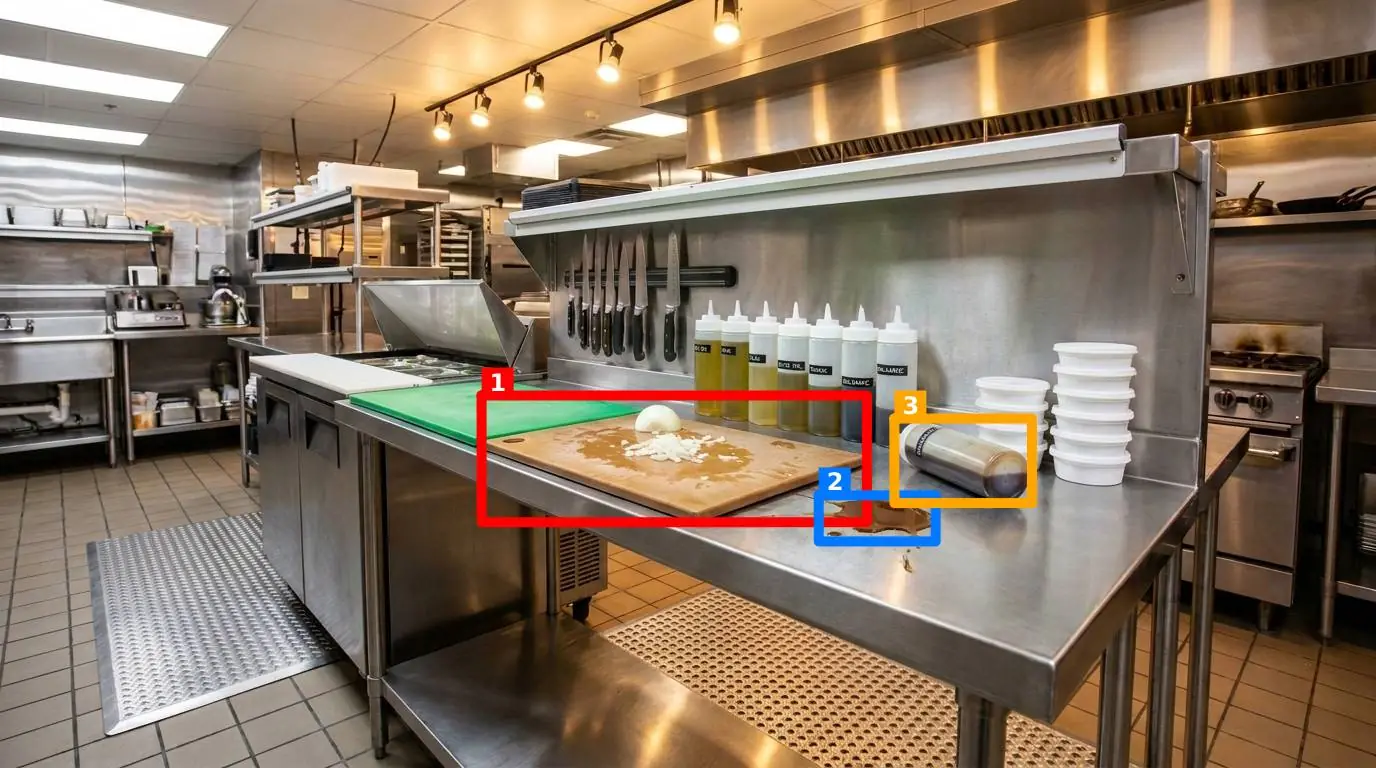
When a worker conducts a round, they simply open a webpage in their phone's browser and photograph the station. The AI compares the live photo against the manager's reference photo based on five toggleable criteria: presence of required items, cleanliness, clutter, position, and orientation. Within seconds, the worker receives a score out of 100, a short message, and a photo with colored boxes drawn around the identified problems, such as a misplaced knife or an unlabelled container.
4. Preventing Falsification with Metadata Checks
Because the system is designed to provide an honest record of the kitchen's state, it includes safeguards against old photos being reused. The software automatically analyzes the image metadata to verify the freshness of the photo. If a worker attempts to upload an old photo to clear today's afternoon checklist, the system flags it immediately.
Closing the Loop: How to Roll Out Visual Standards Next Week
If you are ready to move away from unreliable checklists and establish true visual accountability in your commercial kitchens, you do not need to overhaul your entire operating model overnight. A phased, practical rollout is far more likely to succeed and win the support of your shift managers.
To begin implementing visual standards across your locations, follow these five steps:
- Identify Your Top Three High-Risk Stations: Start with the areas where food safety failures are most costly or most common, such as the raw protein prep station, the allergen prep zone, and the main handwashing sink.
- Capture the Perfect Reference Images: During a quiet period, clean and organize these stations until they represent your brand standards. Take a clear, well-lit photo of each. This is your baseline.
- Set Up Your Notification Paths: Decide who needs to know when a station fails. Because results can be sent directly via email or Telegram to anyone on the notification list for that specific room, you can keep shift leads or area managers informed without requiring them to set up an account.
- Run a Two-Week Pilot on One Shift: Introduce the visual check to a single shift at one location. Show the team how to access the site on their phone browsers, take the photo, and interpret the AI's feedback. Use this period to adjust your reference photos.
- Analyze the Recurring Problems: Use the point history and Pareto views to look for patterns. If the Pareto chart reveals that "clutter" at the handwashing station is a recurring issue, you have a systemic workflow problem, such as a lack of nearby storage, rather than a lazy team. This data allows you to make targeted adjustments.
By focusing on objective visual evidence rather than subjective checkboxes, you give your kitchen teams a clear, achievable standard to maintain. You also give yourself, as an operations leader, something far more valuable than a stack of perfect paper checklists: actual peace of mind, backed by real-time visual proof of your kitchen's safety.