Beyond Checklists: Rethinking Tools of Quality Management
The Gap Between the Checklist and the Floor
You walk the floor. You see a torque wrench sitting on top of a tool chest instead of back on its designated shadow board. Further down the aisle, a mop is left propped against a fire door, holding it open. On paper, your weekly shift checklist says everything is perfect. The operator checked the box for "Area clean and organized," and the supervisor signed off on it. This is the daily reality for operations leads, quality managers, and safety coordinators.
The issue is not a lack of effort. It is that the traditional tools of quality management we rely on—whether they are paper clipboards or digital checklist apps—are fundamentally mismatched with how human beings actually work on a busy floor. They reduce complex, visual environments into binary yes-or-no questions that encourage pencil-whipping. When an auditor has sixty points to cover before their shift ends, checking a box becomes a mechanical task rather than a critical assessment.
To build a culture of high standards, we have to bridge the gap between what the checklist says and what the floor actually looks like. That requires moving away from text-based questions and moving toward visual verification.
Where Traditional Tools of Quality Management Fall Short
When we talk about the classic tools of quality management, we often think of statistical process control charts, Pareto diagrams, or fishbone analyses. These are invaluable for analyzing historical defect rates or diagnosing systemic engineering issues. However, they do not help a shift supervisor maintain basic standard work at 6:00 AM on a Tuesday.
For daily operational discipline, we have relied on checklists. But checklists suffer from three core vulnerabilities that make them unreliable for maintaining a physical standard:
First, they are subjective. What "clean and organized" means to an experienced operator who has been with the company for ten years is often very different from what it means to a temporary hire on their second week. Without a visual reference, both individuals are guessing.
Second, they lack physical context. A checkmark cannot show how a part was out of place, only that the station was deemed acceptable. It provides no feedback loop for the operator to correct their behavior in real time.
Third, they create administrative drag. Managers must manually audit the audits, spending hours walking the floor to verify that the checklists themselves were filled out honestly. This administrative burden scales up rapidly if you are managing five, fifty, or a few hundred sites.
The Psychology of the "Good Enough" Walkthrough
Consider a supervisor in a busy warehouse or distribution centre. They are walking the floor with a digital checklist. They see a prep shelf with a container that might have an expired lot code, but checking it closely requires stepping over a pallet and reading the small print. They select "Yes" on the screen and keep walking.
This is not laziness; it is practical efficiency. When the tool we use treats a thorough physical inspection the same as a quick glance, people will naturally take the path of least resistance. This is why traditional checklist builders like SafetyCulture can sometimes turn into administrative exercises rather than operational safeguards. The focus shifts from the physical reality of the station to the completion rate of the digital form.
To combat this, we need a system where the physical state of the work area is the audit. Instead of translating what we see into a text answer, we must record the visual state directly.
Building a Visual Standard That Actually Sticks
If you cannot define what "right" looks like, you cannot audit it. The most effective way to communicate a standard is not a three-page standard operating procedure (SOP) written in ten-point font; it is a photograph.
A visual standard removes all subjectivity. It shows exactly where the torque wrench must sit, how the safety lines must be clear, and how the hazard labels must be oriented. To build a robust visual auditing process, you must establish clear control points across your footprint. Whether you manage ten sites or two hundred, the process of setting up these points remains the same:
- Identify the high-risk or high-variation areas (e.g., a packing station, a chemical storage cabinet, a loading dock, or a prep table).
- Clean and organize that area to the perfect baseline standard.
- Take a single, clear reference photo of the area. This becomes the source of truth.
This reference photo replaces the vague "Is the station clean?" question with a direct visual comparison: "Does your station look like this photo?"
Comparing Traditional Checklists to Visual Auditing
Here is how visual verification changes the dynamic on the floor compared to traditional methods:
| Feature / Aspect | Traditional Paper & App Checklists | Visual Verification Audits |
|---|---|---|
| Training Requirement | High (must train on SOP definitions of "clean" and "organized") | Low (compare the current state directly to a reference photo) |
| Objectivity | Low (subject to individual interpretation and fatigue) | High (visual evidence does not lie; problems are physically boxed) |
| Verification Time | Slow (requires manual walk-throughs to audit the checklist) | Instant (quick glance at a side-by-side comparison) |
| Historical Tracking | Difficult (requires manual data entry or exporting raw CSVs) | Automatic (visual history per control point over time) |
| Friction on Floor | High (filling out long forms on small screens) | Low (point camera, take photo, and submit) |
How AI Simplifies Visual Verification
While visual auditing is highly effective, manually comparing dozens of photos every day across multiple shifts is too time-consuming for a busy operations lead. This is where AI can assist without adding administrative burden. Instead of forcing operators to fill out long forms, we can use AI to do the heavy lifting of comparison.
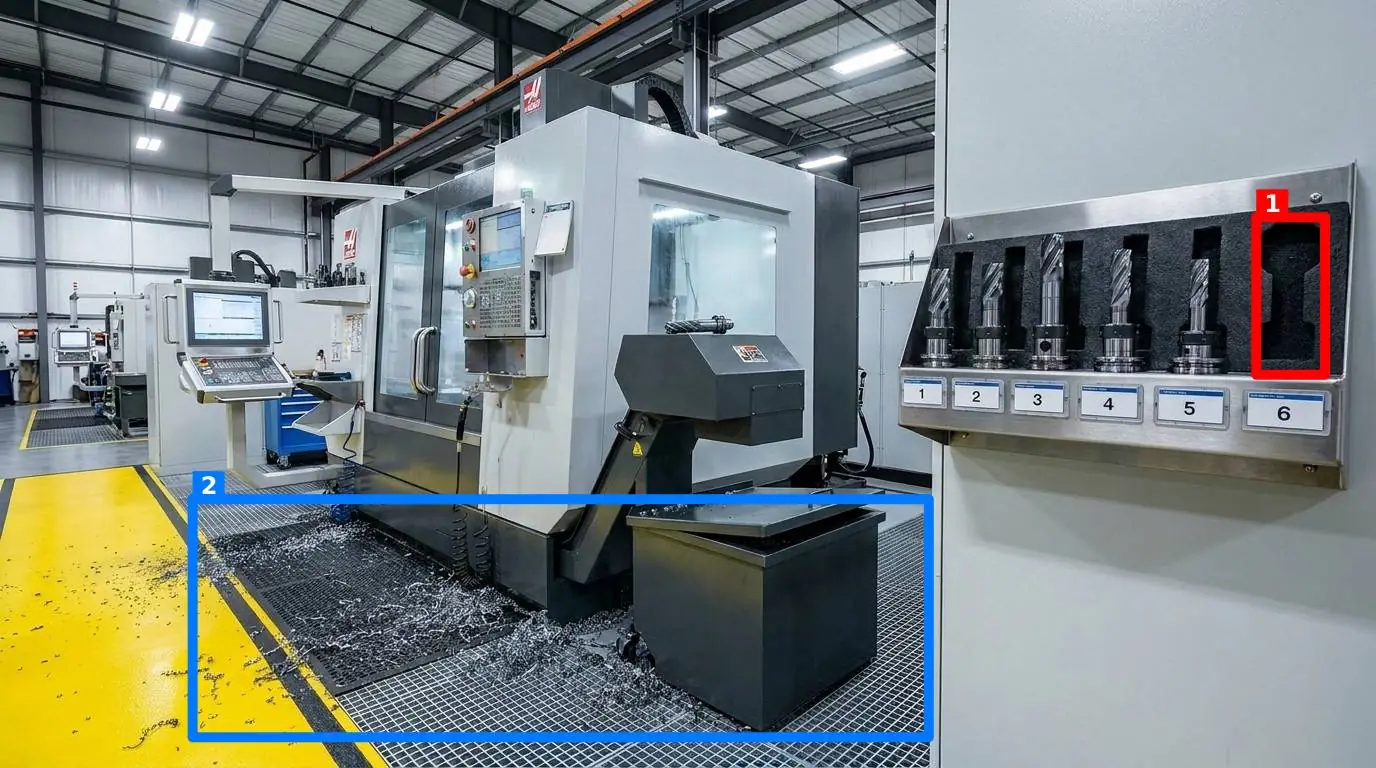
On manufacturing and production floors, this approach transforms the daily routine. An operator simply opens a web browser on their phone, navigates to the site, and takes a photo of their station. There is no app to install, meaning zero friction for temporary or contract workers. The AI instantly compares this new photo against the pre-established reference photo. Within seconds, it returns a score out of 100, along with colored boxes drawn directly on the image around the discrepancies—like a missing safety guard or a stray tool.
We built this exact workflow into SnapAudit. A manager defines the control points (such as a station, a shelf, a machine, or a doorway) and takes one reference photo of each showing how it should look. Workers then photograph the points using their phone browsers. The AI handles the rest, scoring the image and highlighting problems. To make this practical for different environments, managers can switch five specific criteria on or off per control point depending on what matters most for that area:
- Presence of required items: Are safety glasses, lockout locks, or specific tools where they belong?
- Cleanliness: Is the surface free of dust, spills, or debris?
- Clutter: Are there unauthorized items left on the workspace?
- Position: Is the equipment located in the designated spot?
- Orientation: Are valves, switches, or labels facing the correct direction?
Multiple points can be grouped into a single round, so a complete walkthrough covers an entire area seamlessly. Over time, the system builds a history per point and provides a Pareto view of which problems recur, allowing you to target your continuous improvement efforts where they are needed most.
To ensure the integrity of the data, the system checks the photo's freshness directly from the image metadata. This prevents an operator from submitting yesterday's clean photo to pass today's audit. Results are delivered by email and Telegram to whoever is on the notification list for that room, including people without an account, keeping the whole team informed without requiring everyone to log into a platform.
How to Start Transitioning Your Floor
If you are looking to move away from administrative checklists and toward real operational discipline, do not try to overhaul your entire facility overnight. Start small with a single pilot station.
- Select one high-impact control point: Choose a station that frequently suffers from organization issues, such as a packing station, a tool shadow board, or a food prep area in one of your restaurants.
- Define the perfect state: Clean, organize, and set up the station exactly how it should look at the start of every shift.
- Take your reference photo: Capture a clear, well-lit photo of the station. Print this photo and mount it directly at the station as a visual aid.
- Run a manual visual audit for one week: Have your shift leads compare the station directly to the photo at the end of every shift. Note how much faster they identify missing tools or clutter when they have a visual reference.
- Scale with automation: Once the value of visual verification is clear to your team, you can look into automating the comparison process to cover entire rounds. You can review the SnapAudit pricing page to see how visual auditing can cost-effectively scale across your sites.
By shifting from text checklists to visual verification, you stop auditing paperwork and start auditing the physical reality of your floor. The result is a standard that is easy to understand, impossible to cheat, and simple to maintain.