A Practical Guide to Auditing Warehouse Stations Effectively
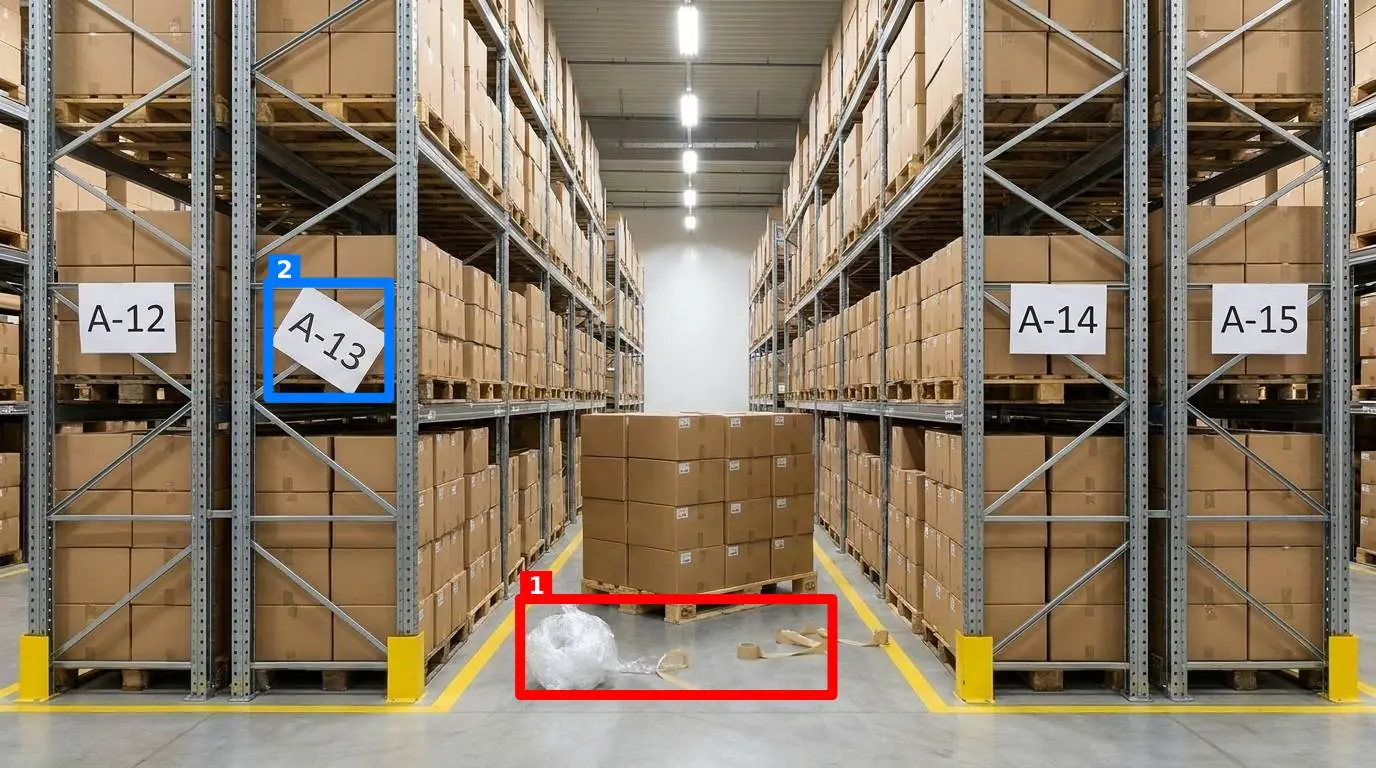
If you manage a distribution center or fulfillment hub, you know the daily walkthrough can feel like a performance. You grab your clipboard or open a checklist app, step onto the floor, and begin the process of auditing warehouse zones. But as you walk past dock doors and packing stations, a familiar frustration sets in. The checklist says everything is fine, yet you can clearly see a roll of stretch wrap rolling under a rack, a mop left leaning against an electrical panel, and a trash bin overflowing at the packing station.
The friction of auditing warehouse setups isn't a lack of discipline; it's the medium we use to record it. Standard checklists turn a highly visual, fluid environment into a series of flat, yes-or-no questions. When a supervisor is rushed, they slide through those boxes just to get back to resolving a backup at the receiving dock. To make standards actually stick, we have to bridge the gap between what the paper says and what the floor actually looks like.
The Illusion of the Completed Checklist
Most warehouse operations rely on some form of written checklist or digital form. A team lead walks the floor, reads a prompt like "Is the packing station clean and organized?", checks "Yes," and moves on. But "clean and organized" is highly subjective. To an experienced operations lead, it means the tape gun is in its designated holder, the scale is clear of debris, bubble wrap is stocked, and the workspace is free of personal items. To a temporary worker hired three days ago, "clean" might just mean there isn't an active spill on the table.
This subjectivity is why checklist systems fail. If you want to dive deeper into why digital lists don't solve this, read about Why Checklist Software Fails on the Shop Floor. When a checklist relies on a human reading a text prompt and translating it into an action, it creates cognitive fatigue. Workers learn to treat the tool as an administrative tax rather than a standard of quality. They click through the questions to get the green light, while the actual physical state of the workstation continues to deteriorate.
Furthermore, standard digital checklists provide zero visual proof. If a supervisor marks a station as compliant, you have to take their word for it. If a safety incident occurs later because a fire door was propped open with a wooden pallet, you have no historical record of when that hazard first appeared or how long it was ignored. You can read more about this disconnect in our analysis of Why Your Next Software Check List Fails on the Floor.
Setting Visual Standards That Stick
To eliminate subjectivity, you must transition from text-based descriptions to visual standards. A visual standard leaves no room for interpretation. If a torque wrench belongs on a specific shadow board at a maintenance station, a photo of that shadow board showing the tool in place is the standard. If a pallet jack must be parked within the painted yellow lines on the floor, a photo of the empty walkway is the standard.
When you define what "good" looks like visually, you make it incredibly easy for anyone on the floor to spot a deviation. A new hire doesn't need to memorize a 20-page standard operating procedure; they just need to look at the reference image and look at their actual workstation.
Let us look at how visual standards compare to traditional checklist items across common warehouse zones:
| Zone / Station | Traditional Checklist Item | Visual Standard Reality |
|---|---|---|
| Packing Station | Is the station stocked and orderly? | Tape dispenser in its designated bracket; scale clear; shipping labels loaded; no personal water bottles on the metal surface. |
| Dock Door | Is the loading dock clear of obstructions? | Yellow safety lines completely visible; no pallets, shrink wrap, or hand trucks parked within the 3-foot clearance zone. |
| Battery Charging | Is the station safe and compliant? | Cables hung up off the floor; watering gun in its holster; spill kit fully stocked and unobstructed; safety goggles hanging on the hook. |
| First Aid Station | Is the first aid kit accessible? | No boxes stacked in front of the cabinet; green light on the automated external defibrillator (AED) flashing; door fully clear. |
By moving to a visual model, you change the conversation from "Did you do the audit?" to "Does your station match the picture?" This simple shift removes the friction of auditing warehouse environments and builds a culture of immediate self-correction.
A Smarter Approach to Auditing Warehouse Workstations
If visual standards are the goal, how do you enforce them without spending hours taking pictures, sorting them into folders, and emailing them to shift supervisors? This is where SnapAudit fits into your daily routine. It is a visual workplace audit tool designed specifically to turn photos into objective, actionable data.
Instead of building long, tedious text templates, an operations manager defines specific control points on the floor. A control point can be a packing station, a shipping dock, a battery charging area, or a fire exit. For each control point, the manager takes just one reference photo that shows exactly how that area must look when it is perfectly organized and compliant.
When it is time to run the audit, the process is incredibly simple for the worker on the floor:
- The worker opens a link in their phone browser. There is no mobile app to download, install, or update, which is critical for operations that use temporary agency staff or have strict device policies.
- They take a real-time photo of the workstation or control point.
- The AI compares the worker's photo against the manager's reference photo.
- Within seconds, the system returns a score out of 100, a short message for the worker, and colored boxes drawn directly on the photo around any identified problems.
To make this highly adaptable to different areas of your facility, managers can toggle five distinct criteria on or off for each control point:
- Presence of required items: Ensures critical tools, like a specific scan gun or safety glasses, are where they belong.
- Cleanliness: Detects dirt, spills, or dust on surfaces.
- Clutter: Identifies foreign objects, like a coffee cup left on a scale or a random cardboard box left on a walkway.
- Position: Confirms that larger items, like trash bins or heavy machinery, are in their designated spots.
- Orientation: Checks if items are facing the correct way, such as a fire extinguisher pressure gauge facing forward.
This automated visual feedback loop gives the worker immediate clarity. They do not have to wait for a supervisor to walk by and point out a mistake; the colored boxes on their screen show them exactly what to fix.
Managing the Floor Without Getting Lost in Admin
For operations leads managing multiple sites or large footprints, keeping track of daily audits can quickly become a full-time administrative burden. If you are using heavy audit and inspection management software, you are likely drowning in custom templates, user permissions, and report generation. You can read how this visual-first approach compares to traditional heavyweights in our guide on how this compares with SafetyCulture.
Simplifying the Walkthrough with Rounds
A practical tool needs to work around the realities of a busy warehouse floor, not force you to adapt to its software constraints. To streamline the process, you can group individual control points into a round. This allows a supervisor or team lead to complete a walkthrough of an entire zone—such as all five dock doors or the entire shipping lane—in one continuous sequence of photos.
Direct Notifications Without Account Barriers
Once a round is completed, the results need to get to the people who can actually fix the issues. Instead of forcing everyone to log into an enterprise dashboard, results are delivered directly via email and Telegram to whoever is on the notification list for that specific room or zone. This means your maintenance lead or shift supervisor receives a direct notification with the annotated photos, even if they do not have an account in the system. They see the red box around the propped-open fire door and can walk over to close it immediately.
Visual History and the Pareto View
To ensure the integrity of your data, the system automatically checks photo freshness using the image's metadata. A worker cannot take a photo of a clean station on Monday morning and re-submit it on Thursday afternoon to bypass their daily check. Every photo must be taken live, in the moment.
Over time, these daily visual checks build a powerful history for every single control point. Instead of guessing which areas are failing, you can access a Pareto view that highlights exactly which problems recur most frequently. If the Pareto chart shows that clutter at a specific workstation is responsible for most of your failed audits, you know exactly where to focus your engineering or training efforts.
First Steps to Build a Visual Audit Routine
Transitioning from paper checklists to a visual standard does not require a massive software deployment or weeks of training. You can start small and scale the process as your team gets comfortable. Here is how to begin:
- Identify three high-impact zones: Choose areas where order and safety are critical but frequently slip. Good candidates include your main packing line, the returns processing desk, or the forklift battery station.
- Establish the standard: Work with your team to clean and organize these three areas to perfection. Sweep the floor, put every tool in its place, and clear out any unnecessary clutter.
- Capture your reference photos: Take a clear, well-lit photo of each area. This becomes your source of truth.
- Set up your control points: Upload your reference photos and toggle the criteria you want to monitor (such as presence and clutter). Group them into a single round for that zone.
- Run a pilot: Have your shift leads open the browser link on their phones during shift changes. Let them photograph the stations and watch how quickly they correct the flagged issues.
By starting with a focused pilot, you prove the value of visual auditing to your team without disrupting daily operations. You move from a reactive state—discovering safety hazards or missing tools only when they cause a delay—to a proactive culture of visual compliance.
If you are ready to see how simple it is to bring visual standards to your facility, you can explore our straightforward plans on our pricing page. Keep your floors clear, your tools in place, and your standards visible.