The Hard Truth About Maintaining 6s in the Workplace
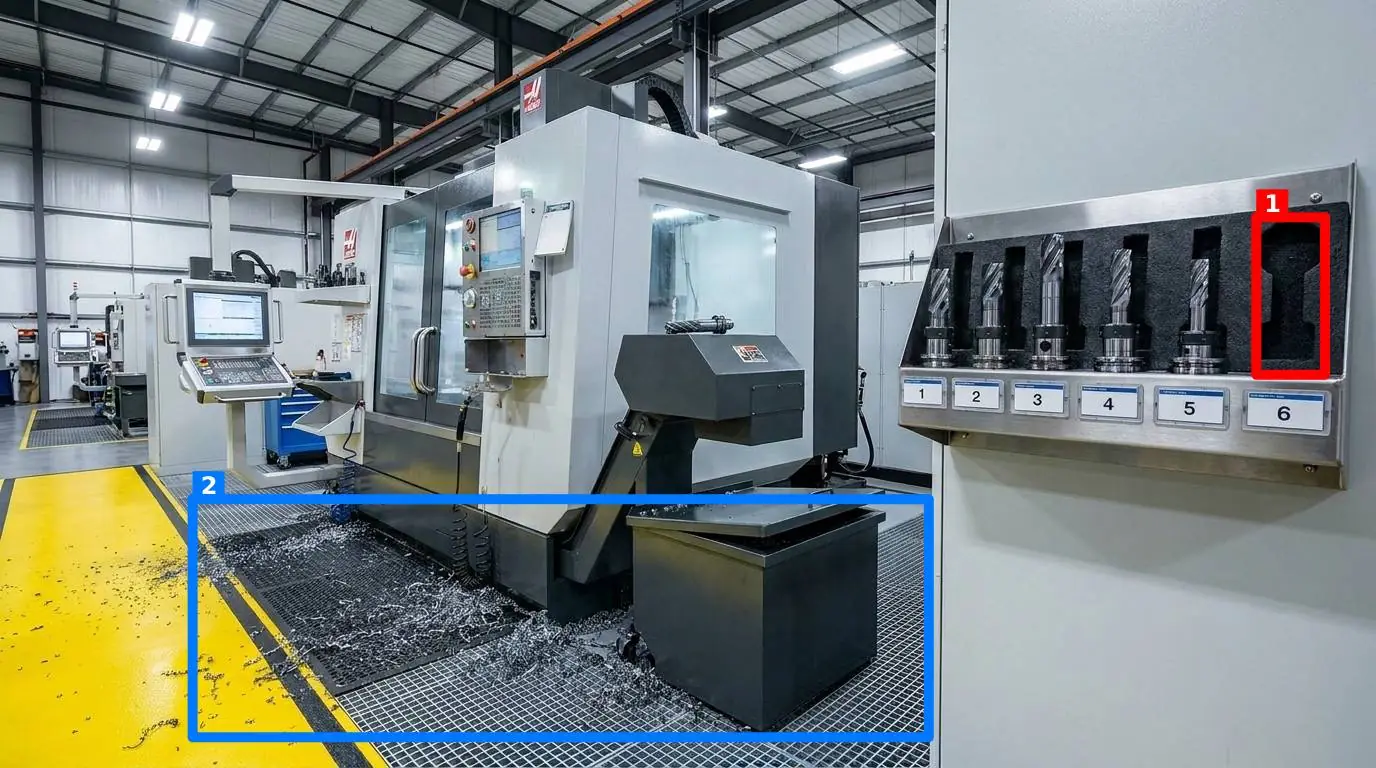
If you have spent any time in a manufacturing facility, you know the cycle. You launch a 6s in the workplace initiative. You buy the floor tape, you label the shelves, and you clear out the red tag area. For the first week, the floor looks like a showroom. By week four, the torque wrench is missing from its shadow board, a mop is leaning against a fire exit, and the yellow lines are disappearing under a layer of metal shavings. The standard has not just slipped; it has dissolved.
The problem is rarely a lack of intent. Most supervisors and quality managers care deeply about the state of their floor. The problem is the friction of the audit. When you are managing three hundred sites or even just five busy production lines, the tools we use to maintain standards often become the very things that prevent us from seeing them clearly. Paper forms are filled out in the breakroom from memory. Digital checklists are clicked through as fast as possible to satisfy a KPI. In the industry, we call this pencil-whipping, and it is the primary reason why 6s in the workplace fails to stick.
The Sixth S: Why Safety Changes the Audit Dynamic
For years, the gold standard was 5S: Sort, Set in Order, Shine, Standardize, and Sustain. But the addition of the sixth S—Safety—is what moves these efforts from an aesthetic exercise to a core operational requirement. We have discussed previously how 5S vs 6S comparisons show that adding safety actually improves the floor by giving workers a tangible reason to care about order. A misplaced micrometer is a productivity loss; a propped-open fire door or a leaking drum of hydraulic fluid is a catastrophe.
When safety is integrated, the audit becomes less about neatness and more about risk mitigation. However, identifying these risks requires a level of detail that a standard yes-or-no checklist cannot capture. A checklist asks: Is the station clean? The worker marks yes. But what if the station is clean but the emergency stop button is obstructed by a stack of pallets? Or what if the station is organized, but an expired lot of adhesive is sitting on the prep shelf? These are the nuances that fall through the cracks of traditional audit and inspection management software that relies solely on text-based inputs.
The Visual Gap in Traditional Auditing
The core failure of the checklist is that it is abstract. It translates a physical reality into a binary choice. This creates a disconnect between the manager who owns the standard and the worker who is supposed to maintain it. When you walk the floor, you are not looking for checkmarks; you are looking for deviations from a mental image of how things should be. You see the torque wrench is missing because you know what the shadow board looks like when it is full.
This is why we often see why your 5S audit checklist lies to you. It lies because it is subjective. One shift lead's definition of clean is another's definition of filthy. To achieve a true 6s in the workplace culture, you need to remove the subjectivity. You need to compare the reality of the floor against a fixed, visual reference. This is where the concept of the control point becomes essential. By defining a specific station, shelf, or machine as a control point and capturing a reference photo of its ideal state, you create an objective truth that cannot be argued with.
Bridging the Gap: Measuring 6s in the Workplace
To sustain a high standard, the feedback loop must be immediate and visual. This is where SnapAudit changes the workflow: the manager defines a control point and takes one reference photo of that station in its ideal state. When a worker performs a walkthrough, they do not need to log into a complex system or install a mobile app. They simply open the site in a phone browser and photograph the point. The AI then compares the two photos—the reference and the reality—and returns a score out of 100.
The power of this approach is in the specificity. The AI does not just give a grade; it draws colored boxes around the problems. It looks for five specific criteria that can be toggled on or off depending on the needs of that specific area: presence of required items, cleanliness, clutter, position, and orientation. If a fire extinguisher is missing, the AI boxes the empty space. If a mop is left in a walkway, the AI boxes the obstruction. This visual feedback is delivered as a short message to the worker, providing an instant correction that a paper form could never achieve.
Defining Audit Criteria for Different Zones
Not every area on the floor requires the same level of scrutiny. A chemical storage room has different 6S requirements than a packaging bench. By adjusting the five criteria, you can tailor the audit to the specific risks of the zone.
| Zone Type | Critical Criteria | Example Deviation |
|---|---|---|
| Assembly Line | Position & Orientation | Torque wrench placed outside the shadow board footprint. |
| Loading Dock | Clutter & Presence | Empty pallets blocking the yellow safety egress lanes. |
| Tool Crib | Presence & Cleanliness | Missing specialty gauges or oil residue on precision surfaces. |
| Lab/Testing | Presence & Orientation | Expired calibration samples or labels facing away from the aisle. |
The Infrastructure of a Sustainable Audit
Sustainability in 6S is about more than just checking boxes once a week. It is about creating a rhythm of accountability that involves everyone from the shop floor to the executive office. To make this work, the data gathered from these visual audits must be accessible to those who can act on it, even if they do not have an account in the system.
Results from these walkthroughs are delivered by email and Telegram to the specific notification list for that room. If a night shift supervisor sees a failing score for a critical safety point, they get the photo with the problems boxed on their phone immediately. This transparency prevents the common problem of audit results sitting in a filing cabinet or a database until the end of the quarter. Furthermore, to maintain the integrity of the data, the system checks the photo freshness from the image metadata. This ensures that a worker cannot re-submit a photo from a month ago when the station was perfect; the evidence must be from the present moment.
By grouping these points into a round, a single walkthrough can cover an entire department. Over time, this creates a historical record of performance. By using SnapAudit to aggregate these scores, you can access a Pareto view of which problems recur. Are you constantly failing on cleanliness in the machining center? Is the shipping dock always cluttered? This data allows a manager to stop being a fire-fighter and start being a strategist, addressing the root causes of 6S decay rather than just cleaning up the same mess every Monday morning.
Practical Steps to Launching Your First Visual Round
If you are ready to move away from the frustration of paper checklists and toward a visual standard, the best approach is to start small. Do not try to map the entire plant in a single day. Instead, focus on the areas where the gap between the standard and the reality is the widest.
- Select three high-impact stations where 6S compliance is currently a struggle.
- Clean and organize those stations to the exact standard you expect every shift to maintain.
- Take a high-quality reference photo of each station using the browser-based tool.
- Set the AI criteria—for example, focus on clutter and presence for a packing area.
- Identify the supervisors who should receive the Telegram or email alerts for these areas.
- Run the round for one week and review the Pareto view to see where the deviations are happening.
Sustaining 6s in the workplace is not a project with a finish line; it is a continuous process of observation and correction. By replacing the subjective checklist with objective visual evidence, you give your team the clarity they need to maintain the standard and the safety they deserve. You can learn more about how to structure these visual standards by exploring our product overview or checking the pricing for a plan that fits your site count. The goal is simple: make the right way to work the easiest way to work.